

Guide
Google Ads AI Agent: What It Does and When It Helps
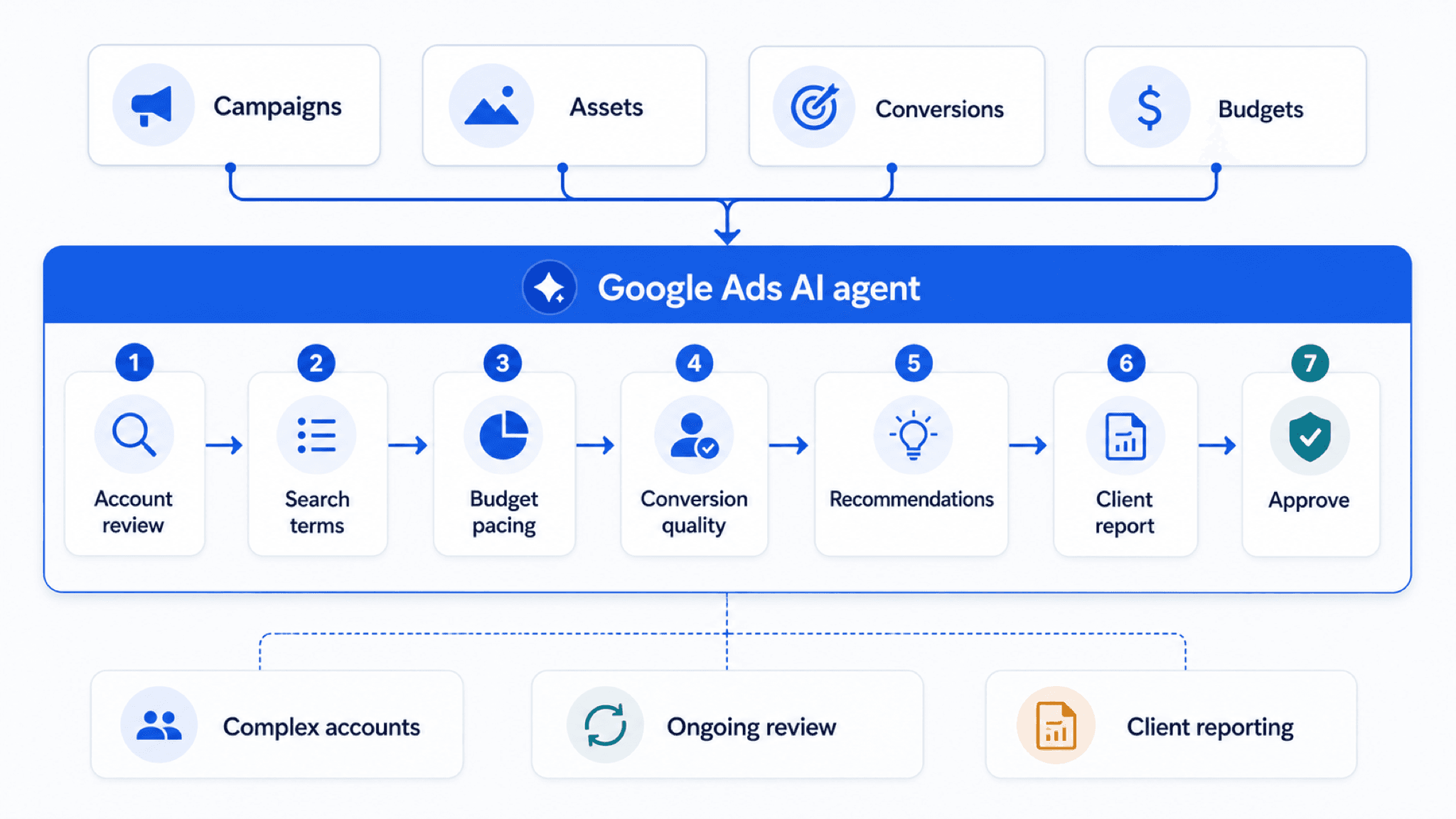
Native Google Ads tools run the platform mechanics. The agent reviews, explains, reports, and drafts the work around them for approval.
What a Google Ads AI agent can see, what it finishes, and what it ships only with approval: the category defined by its three boundaries, with the checks that separate real agents from chat tools.
Key takeaway
A Google Ads AI agent is software that connects to your Google Ads account, reads the live data a review actually needs, search terms, budgets, conversion actions, Change history, Recommendations, and finishes real account work: audits, reports, spreadsheets, and drafted changes that wait for a person to approve. The category is defined by three boundaries: what the agent can see, what it finishes, and what it is allowed to ship.
Parallel AI is the AI agent platform for Google Ads work. Teams hand off research, launches, experiments, budget pacing, reporting, and optimization; the agent works from the connected account and every account change it drafts waits for human approval.
An agent does not replace Google Ads. Smart Bidding, AI Max, Recommendations, Performance Max, and manager accounts run the platform mechanics inside the account. The agent owns the work around them: diagnosis, prioritization, reporting, and the controlled path from analysis to an approved change.
Checked against current product, pricing, trust, and official Google materials so the explanation stays tied to the live product and current Google Ads context.
- Native platform boundaries are described from current Google Ads Help references for AI Max, Smart Bidding, Recommendations, and manager accounts.
- Connected-account and reporting claims are checked against current product, billing, review, and approval controls before changes go live.
- Next-step links stay focused on the pricing, shortlist, ROI, agency, ecommerce, and implementation decisions that follow It.
- Product fit here means real Google Ads jobs: review speed, shared reporting, and account changes that stay under human control, not generic AI helper claims.
Tuesday, 8:40 AM. Spend is up 18 percent, the client call is at 2:00 PM, and the answer is spread across the search terms report, Change history, two budget screens, and a colleague's memory of what changed last sprint. By hand, assembling that answer is the day. The category exists because of mornings like this one.
DEFINITION
Google Ads AI agent
Software that connects to a Google Ads account, reads live campaign structure, budgets, conversion actions, search terms, and Change history, and finishes account work as audits, reports, spreadsheets, and drafted changes held for human approval. Distinct from native platform automation, which executes inside Google Ads, and from generic chat tools, which can discuss an account but cannot read or finish anything in it.
Category definition maintained against the live product
Every tool wearing the label can be tested against three boundaries. What can it see: a connected account with real campaign structure and history, or only the screenshots and exports you paste into a prompt. What does it finish: a report someone can forward, a sheet someone can sort, a drafted change someone can approve, or just advice that leaves the work where it started. And what is it allowed to ship: nothing without a person, or changes you discover in Change history after the fact.
Those three questions sort the market faster than any feature list, because each one is checkable in a trial week and none of them can be faked in a demo. The rest of It walks each boundary, then routes you to the comparison, pricing, or rollout decision that follows.
If a tool's answer to all three boundaries is a demo video instead of a checkable behavior, the evaluation is already over.
The first boundary separates agents from chat tools. A model with no account access can sound expert about Google Ads in general while knowing nothing about your Google Ads in particular: which conversion action drives Smart Bidding, what changed in the account two Thursdays ago, which campaigns are budget-limited, where Performance Max is spending. Pasting a screenshot into a prompt does not close that gap; it samples the account at one moment through one keyhole.
A connected agent reads the surfaces a serious review actually uses: the search terms report, Recommendations, Change history, conversion goals and their lag, budget pacing, asset groups, and manager-account rollups. That is also why the boundary matters commercially: diagnosis quality is capped by visibility, and visibility is a yes-or-no architectural fact about the tool, not a skill the model can make up for.
Native Google AI sits inside this boundary by definition, and that is its strength and its limit at once. Smart Bidding sees every auction but optimizes toward whatever target it was handed. The fuller comparison lives in automation vs AI agents: rules know thresholds, Smart Bidding knows auctions, the agent knows the account.
The second boundary is output. Every job below is real agent work, but only when it ends as something a person can read, forward, or approve, not as a suggestion that still needs a blank page.
Campaign audits
Campaign structure, conversion actions, Change history, Recommendations, budgets, and underperforming segments reviewed and written up before the team decides what to change.
Ad copy and creative review
Responsive search ads, asset groups, text assets, product messaging, and creative gaps assessed before new assets move into production.
Bid and budget recommendations
tCPA, tROAS, Maximize conversions, Maximize conversion value, budget pacing, and budget-limited campaigns explained in terms the team can review and act on.
Search term governance
Search terms, negative keyword candidates, match-type expansion, brand controls, and query-intent drift reviewed before overblocking or expanding too quickly.
Multi-account reviews
Trends compared across manager-account portfolios, client accounts, business units, or ecommerce regions without rebuilding the same review from scratch.
Performance reporting
Google Ads data turned into client updates, executive summaries, budget notes, pacing tables, and follow-up plans ready for review.
The test for every row above is the same: did the job finish as something you could forward, or did it finish as homework.
The third boundary is the one that makes the other two safe to use. Parallel AI runs the full loop on the connected account, and the loop ends at a person, every time.
01
Connect
Connect the Google Ads accounts the team actually manages, so the work starts from live campaign structure, metrics, settings, and recent account context.
02
Ask
Hand off a specific Google Ads job: diagnose a CPA spike, review wasted spend, compare account performance, prepare a client report, or plan the next campaign change.
03
Review
Read the recommendation, report, table, or proposed change, with the account evidence attached, before anything higher-impact moves forward.
04
Approve
Move finished work into a doc, sheet, or summary, and release drafted account changes only when the person who owns the number signs off.
Automation executes instantly by design. The agent deliberately does not, because the work it handles is exactly the work where judgment earns its keep. The full sequence lives in how Parallel AI works for Google Ads.
Agencies feel the finishing boundary first: the gap between finding the problem and getting it into the client deck is where billable hours leak, and a standardized weekly review that ends client-ready protects margin across every pod. The full case lives in the agency guide.
In-house teams feel the seeing boundary: one or two people own every campaign type with no slack for a day of manual log-reading, so connected-account diagnosis is the difference between reviews that happen weekly and reviews that happen when something breaks. Solo specialists and lean teams often see the largest gains for the same reason: repetitive review work consumes the biggest share of their week.
Ecommerce teams live closest to the data: feed health, Merchant Center diagnostics, and Performance Max visibility sit upstream of every campaign question, which is why the ecommerce guide starts at the catalog rather than the campaign.
Google's own AI is not the competition; it is the machinery the review is about. The split holds across every major job.
| Job | Native Google Ads surface | Where an AI agent helps | What still needs human review |
|---|---|---|---|
| Search expansion | AI Max, broad match, search terms report | Explain which queries, landing pages, and headlines need review | Brand fit, lead quality, exclusions, and final approval |
| Bidding | Smart Bidding, Target CPA, Target ROAS, Maximize conversions, Maximize conversion value | Connect bidding changes to conversion quality, budget pacing, and recent performance | Business goals, margin, sales cycle, and acceptable risk |
| Portfolio management | Manager accounts and account-level reporting | Summarize cross-account risks, budget movement, and client reporting needs | Prioritization across clients, regions, or business units |
| Change control | Recommendations, Change history, account settings | Package proposed changes with rationale and next steps | Approval on budgets, bids, keywords, assets, and settings |
Pick one account segment and one recurring review that keeps slipping, a weekly search terms pass, a budget pacing check, or a client report. Define the baseline first: the hours the manual version costs, the findings it usually catches, and a KPI window you trust. Then run the same review through the agent and judge the report, brief, or recommendation, not the demo: did it read the real account, did it finish something you could forward, and did every proposed change wait for your approval.
Price the result against the hour the work costs, not against the tool budget; the arithmetic lives in the pricing guide and the ROI comparison. If you are building a shortlist, the best-agents roundup judges every tool at the same finish line.
On Monday morning, choose the one review your team keeps deferring, write down what it costs you by hand, and run it through one agent on one connected account before anyone debates features in the abstract.
Any system touching ad spend has to be trustworthy before it is useful. Parallel is built around secure account connectivity, clear permissions, and explicit human review before higher-impact changes. For any Google Ads AI solution, the baseline checklist is the same: OAuth-based access, auditability of actions, and a clear explanation of how account data is handled. The details live on the page and in the ; read both before adopting any system that touches account data or approvals. A vendor that cannot answer the access question plainly has answered it.
Google documentation
Google's current documentation for AI Mode and AI Max built on broad match, Smart Bidding, and responsive search ads.
Official Smart Bidding reference for Google's automated bid optimization systems.
Official overview of AI Max for Search campaigns, including matching, creative, reporting, and controls.
Official manager-account reference for agencies and teams managing multiple Google Ads accounts from one place.
Official reference for Google Ads Recommendations and how they use account history, campaign settings, and trends.
Official reference for using the search terms report to review which searches triggered ads and identify keyword or negative keyword updates.
Official budget reference for average daily budgets, spending limits, daily costs, shared budgets, and budget reports.
Official Performance Max reference for campaign scope, inventory, goals, asset groups, and optimization context.
About Parallel
Current security, data-handling, and connectivity framing.
Company mission and editorial review context behind the published guides.
Google Marketing Live 2026
Start with the Google Marketing Live 2026 guide, then move into the Search, AI Max, Shopping, Demand Gen, bidding, data, and measurement checks Google Ads teams need next.
- Google Marketing Live 2026: What Google Ads Teams Should Review FirstSearch, AI Max, Shopping, Demand Gen, bidding, and measurement each need an account check before GML 2026 changes move spend or client plans.
- Google Search Ads After GML 2026: AI Mode, Offers, and Lead QualityLanding pages, offers, and lead-quality data decide whether AI Mode ads and AI Max expansion produce useful Search demand after GML 2026.
- DSA to AI Max Migration Checklist for Search CampaignsDynamic Search Ads exposure, URL controls, and reporting baselines need a September 2026 readiness plan before eligible Search campaigns upgrade to AI Max.
- AI Max Final URL Expansion and Text Disclaimers: Regulated Advertiser ReviewRequired text, URL exclusions, and landing-page reporting need a signed review before AI Max Final URL expansion or text disclaimers go live.
- AI Mode and AI Max Readiness Checklist for Google AdsAn AI Mode and AI Max readiness checklist for Google Ads accounts covering AI Max, search terms, final URLs, conversion quality, budgets, and reporting.
- AI Max Expansion After GML 2026: What to Audit Before You Adopt ItA boundary guide for deciding which AI Max decisions stay inside Search campaigns and which still need account review.
- AI Max Testing Playbook for Google Ads Search CampaignsAI Max is an experiment, not a toggle. The playbook keeps a 50/50 Search test readable while query, URL, and copy surfaces shift underneath.
- AI Max Text Guidelines: Keep Google Ads Copy On-BrandText guidelines are the brand contract with AI Max generated copy. Unwritten rules become Google defaults across assets, final URLs, and search terms.
- Direct Offers in AI Mode: Retail Pilot Readiness for Google AdsDirect Offers put the deal inside the AI Mode answer; readiness is margin, feed truth, and inventory before pilot scale.
- Direct Offers and UCP: Ecommerce Readiness After GML 2026Product feeds, Promotions, checkout links, and Google Pay ownership decide whether Direct Offers and UCP surfaces are commerce-ready after GML 2026.
- Accelerated Checkout for Demand Gen: Ecommerce Review GuideA Demand Gen accelerated checkout review guide for ecommerce teams checking product feeds, purchase quality, and budget risk.
- Merchant Center Predictive Insights: Review Guide for EcommerceMerchant Center predictive insights are cheapest at forecast price; review inventory, feeds, and PMax economics before acting.
- Merchant Center Brand Profile Governance GuideMerchant Center brand profiles are shelf space Google fills with or without you; governance names who stocks it and how feeds and campaigns stay aligned.
- Demand Gen and YouTube After GML 2026: Creative, Commerce, MeasurementCreative review rules, Product feed health, checkout paths, and conversion quality decide whether Demand Gen expansion on YouTube is launch-ready.
- Demand Gen for B2B and Ecommerce: Diagnose Quality Beyond CTRWhy B2B and ecommerce need different Demand Gen scorecards when proof arrives on different timelines.
- Demand Gen Platform-Comparable Conversions: Report the Metric CarefullyHow to use Demand Gen platform-comparable conversions for cross-platform proof without mistaking them for primary business metrics.
- Asset Studio After GML 2026: Creative Review Rules for Google Ads TeamsShareable assets move Asset Studio approval out of screenshots. Set review rules for generated creative, shareable links, and 1-Click A/B Testing before campaigns scale.
- Asset Studio Veo 3 Video Guide: Review Generated Video Before Campaign UseGenerated video scales volume, not judgment. Classify Asset Studio batches by risk, set launch limits, and review conversion quality before budget expands.
- Journey-Aware Bidding and Lead Quality Readiness for Google AdsCRM hygiene and conversion imports decide whether journey-aware bidding can learn from the full lead-to-sale path before Target CPA moves.
- Smart Bidding Exploration for Performance Max and Shopping: Test PlanSmart Bidding Exploration spends real budget to learn new categories; the playbook caps tuition before traffic diversity becomes strategy.
- Google Ads Budget Pacing Update 2026: What Changed and What HoldsWhy a campaign can look ahead of plan in 2026 without breaking budget rules, and when the curve actually calls for intervention.
- tCPA and ROAS Optimization Across Google Ads Accounts With AICross-account tCPA and ROAS work starts with target hygiene and portfolio ranking before bid changes.
- Data Manager Conversion Diagnostics: Fix Drift Before Bid ChangesConversion diagnostics read Data Manager plumbing first; fix source health and lag before bid or budget changes.
- Google Ads Data Manager: First-Party Data Source ReviewFirst-party data needs named owners for consent, freshness, and match rate before Customer Match or imports scale in Data Manager.
- Meridian, Google Analytics 360, and QFCs for Finance ReviewsMeridian, Qualified Future Conversions, and Data Manager only help finance when conversion actions and offline imports are clean enough to explain.
- Google Tag Upgrade Checklist for Paid Media Teams After GML 2026A Google tag upgrade checklist for Tag Diagnostics, tag coverage, Tag Assistant, consent setup, conversion actions, Data Manager, Google Tag Gateway, Smart Bidding, CPA, ROAS, and reporting quality.
- Ask Advisor in Google Analytics for Google Ads Teams: What to Review NextAnalytics findings need joins into Google Ads campaigns, conversions, and Change history before action.
- Performance Max Channel Reporting PlaybookWhy the PMax channel report shows where spend went but not why, and how to route weekly shifts to feeds, asset groups, and search terms.
- Ask Advisor and AI Agents After GML 2026: Native Google Help vs Team ReviewAsk Advisor works inside Google Ads on Google's priorities. An agent works across the connected account on yours for reviews, docs, and approved next steps.
- Google Ads AI Agent for Agencies: Reviews, Reports, and ControlsFind where agency margin leaks between account review and client-ready delivery, then standardize the pod around that handoff.
- Google Ads AI Agent for Ecommerce: Search Terms, Shopping, and PMax ReviewRun one ecommerce review loop that starts upstream in feed and catalog reality before campaign symptoms steal the week.
- AI Tool for Multiple Google Ads Accounts: Reviews and ReportsMulti-account Google Ads management fails at the pattern level. Choose tools that spot the outlier and finish the portfolio review.
- Why Google Ads Feels Harder in 2026A practical explanation of why Google Ads feels harder in 2026 across AI Max, PMax, Demand Gen, measurement, budgets, CPA, ROAS, and reporting.
- Google Ads AI Agent: What It Does and When It HelpsThe category defined by its three boundaries: what an agent can see, what it finishes, and what it ships only with approval.
Buying and evaluation
Start here if you are deciding whether to buy, how to compare vendors, and how to pressure-test cost or ROI before rollout.
- Google Ads AI Agent Pricing: Seats, Account Limits, and Total CostCompare AI-agent pricing against the labor, rework, and approvals the plan actually removes or preserves.
- Best AI Agents for Google Ads: How to Evaluate the ShortlistA shortlist guide that judges Google Ads AI-agent options by the work they finish after the recommendation, not by feature counts.
- Google Ads Copilot Alternatives: Native AI, PPC Platforms, Scripts, and AgentsChoose Google Ads copilot alternatives by which manual work stops, not by which product mentions AI most often.
- Google Ads AI Agent vs Manual Management: ROI Framework for PPC TeamsUse a measurement-first ROI model that counts skipped reviews, rework, and approvals instead of only hours saved.
Native Google AI and external agents
Read these guides when the real question is what should stay in Google Ads, what belongs in automation, and where an external AI agent adds value.
- Ask Advisor and AI Agents After GML 2026: Native Google Help vs Team ReviewAsk Advisor works inside Google Ads on Google's priorities. An agent works across the connected account on yours for reviews, docs, and approved next steps.
- Google Ads Automation vs AI Agents: Rules, Native AI, and Agent-Led ReviewA practical split of Google Ads work by what rules can see, what Smart Bidding can see, and what still needs an agent with approval.
- AI Max Expansion After GML 2026: What to Audit Before You Adopt ItA boundary guide for deciding which AI Max decisions stay inside Search campaigns and which still need account review.
Weekly review playbooks
Read these when you need a concrete weekly review model for agencies, ecommerce teams, or search leads building a repeatable account-review rhythm.
- How AI Agents Help Optimize Google Ads: Reports, Settings, and Review StepsSee how Google Ads optimization improves when the system reads the account, ranks the work, and prepares reviewed changes.
- Google Ads AI Agent for Agencies: Reviews, Reports, and ControlsFind where agency margin leaks between account review and client-ready delivery, then standardize the pod around that handoff.
- Google Ads AI Agent for Ecommerce: Search Terms, Shopping, and PMax ReviewRun one ecommerce review loop that starts upstream in feed and catalog reality before campaign symptoms steal the week.
Detailed buying guides
Use these when the query is more specific than the core best page and the decision turns on review depth, reporting quality, portfolio fit, or a narrower buying lens.
- AI Tools for Live Google Ads Optimization: What to Use in 2026Live optimization is a review cadence, not tool speed. Choose AI tools your approval process can keep up with.
- Best AI Agent for Google Ads Audits and Reporting: What PPC Teams Should CompareJudge Google Ads audit agents at the deck, not the scan. Compare tools by client handoff quality.
- Best AI Agent for Managing Google Ads Work in 2026A noindex management-agent support page consolidated under the AI-driven Google Ads management guide.
- Best AI Tools for Managing Google Ads Accounts: Multi-Account GuideA noindex multi-account tool support page consolidated under the recovered multi-account guide.
- Best Google Ads AI Agent for Optimization and ReportingJudge Google Ads AI agents by whether the report they write can become the change they draft.
Competitor comparisons
Use these pages when the buying decision is down to Parallel and a specific competitor is already in the active evaluation set.
- Parallel AI vs Optmyzr: Which Google Ads Workflow Fits Better?Optmyzr's rules execute faster across three ad platforms; the write-up that survives a client meeting is what Parallel is built to finish. Side-by-side fit guide for Parallel AI and Optmyzr on Google Ads review, reporting, and approval discipline.
- Parallel AI vs Adalysis: Which Google Ads Workflow Fits Better?Adalysis catches the audit miss inside the MCC; Parallel is the stronger fit when the finding has to become a client deck or QBR summary, not another alert row. Side-by-side fit guide for Parallel AI and Adalysis on Google Ads review, reporting, and approval discipline.
- Parallel AI vs Adsroid: Which AI Ads Workflow Fits Better?Adsroid pushes answers into Slack and Google Slides on higher plans; Parallel is the stronger fit when Google Ads is the center and the weekly account review has to live in docs, sheets, and reports in one place. Side-by-side fit guide for Parallel AI and Adsroid on Google Ads review, reporting, and approval discipline.
- Parallel AI vs groas: Which Google Ads Workflow Fits Better?groas can optimize without approval; Parallel is the stronger fit when campaign changes still wait for a named approver, a written rationale, and a report someone can defend. Side-by-side fit guide for Parallel AI and groas on Google Ads review, reporting, and approval discipline.
- Parallel AI vs Ryze AI: Which Paid Media Workflow Fits Better?Ryze AI sells strategist-led coverage across Google, Meta, ChatGPT, and Perplexity; Parallel is the stronger fit when the paid search lead still runs the Google Ads account inside a product with connected analysis, docs, sheets, and drafted changes waiting for approval. Side-by-side fit guide for Parallel AI and Ryze AI on Google Ads review, reporting, and approval discipline.
- Parallel AI vs Opteo: Which Google Ads Workflow Fits Better?Opteo surfaces recommendations inside Google Ads; Parallel is the stronger fit when the same finding has to carry into docs, sheets, summaries, and a client-ready report. Side-by-side fit guide for Parallel AI and Opteo on Google Ads review, reporting, and approval discipline.
- Parallel AI vs Madgicx: Which Ads Workflow Fits Better?Madgicx optimizes media buying and creative across Meta, Google Ads, GA4, Shopify, Klaviyo, and TikTok; Parallel is the stronger fit when deep Google Ads account review and reporting matter more than cross-channel creative automation. Side-by-side fit guide for Parallel AI and Madgicx on Google Ads review, reporting, and approval discipline.
Agency and multi-account teams
These pages focus on agencies, pod operations, and multi-account teams that need shared context, repeatable reviews, and portfolio-safe reporting support.
- Best AI-Powered Google Ads Tools for Agencies in 2026Rank agency Google Ads tools by which hour of labor each one removes across manager accounts, diagnosis, reporting, and approval.
- AI Tool for Multiple Google Ads Accounts: Reviews and ReportsMulti-account Google Ads management fails at the pattern level. Choose tools that spot the outlier and finish the portfolio review.
- Can AI Manage Google Ads Campaigns for Agencies?A noindex agency support page on where AI helps Google Ads management and where humans stay accountable.
- Best AI Agent for Google Ads Agencies: Start With the Agency GuideA noindex agency-agent support page consolidated under the main Google Ads agency guide.
How the product works in practice
Open these when the question is how the product actually works in practice, from category definitions and connected audits to wasted-spend diagnostics and hybrid management.
- What Are AI Agents for Google Ads? Start With the Main GuideA noindex category-definition support page consolidated under the main Google Ads AI agent guide.
- AI-Driven Google Ads Management: What Teams Should Automate in 2026AI-driven management has one non-delegable job: account intent. Everything downstream can be drafted with review.
- AI Agent That Connects to Google Ads for Campaign Audits: What It Should CheckConnected Google Ads audit agents produce checkable findings on live account data, not static export slides.
- How to Find Wasted Spend in Google Ads With AIWasted spend hides in search terms nobody rereads. This playbook puts rereading first, then AI grouping.
Fresh platform rollouts
Use these pages when the question is what Google just changed, whether the change deserves a test, and how teams should review the rollout without treating it like a generic news summary.
- Google Ads Budget Pacing Update 2026: What Changed and What HoldsWhy a campaign can look ahead of plan in 2026 without breaking budget rules, and when the curve actually calls for intervention.
- AI Max Text Guidelines: Keep Google Ads Copy On-BrandText guidelines are the brand contract with AI Max generated copy. Unwritten rules become Google defaults across assets, final URLs, and search terms.
- Should You Opt Out of AI Voice-Over in Performance Max?AI voice-over in Performance Max is brand voice by default. Review product accuracy, policy risk, video assets, conversion value, and ROAS before you keep, limit, or opt out.
- Demand Gen Asset Optimization Audit: Review Controls Before Weekly ScaleHow to read Demand Gen asset reporting by spend and results before scale, revise, or pause calls.
- Demand Gen Lookalike Signals Migration: Keep Lead Quality StableWhy Demand Gen audience migration is signal-feeding, and how to hold quality stable while exploration widens.
- Attributed Branded Searches in Demand Gen: How to Use the MetricHow to read Demand Gen attributed branded searches as direction started, with corroboration before budget moves.
- Shoppable CTV in Demand Gen: Readiness GuideShoppable CTV readiness in Demand Gen: see QR paths, feeds, and conversion value before TV budget scales.
- Smart Bidding Exploration for Performance Max and Shopping: Test PlanSmart Bidding Exploration spends real budget to learn new categories; the playbook caps tuition before traffic diversity becomes strategy.
- Account-Level Optimization in Google Ads: Conversion Goal ReviewAccount-level optimization is refereeing campaign competition before conversion defaults reshape bidding.
- Google Tag Upgrade Checklist for Paid Media Teams After GML 2026A Google tag upgrade checklist for Tag Diagnostics, tag coverage, Tag Assistant, consent setup, conversion actions, Data Manager, Google Tag Gateway, Smart Bidding, CPA, ROAS, and reporting quality.
- Ask Advisor in Google Ads Beta: How to Review RecommendationsScoped permissions and a review habit turn Ask Advisor (beta) suggestions into apply, test, hold, or reject decisions across budgets, bidding, Search, and Performance Max.
- Asset Studio After GML 2026: Creative Review Rules for Google Ads TeamsShareable assets move Asset Studio approval out of screenshots. Set review rules for generated creative, shareable links, and 1-Click A/B Testing before campaigns scale.
- Direct Offers in AI Mode: Retail Pilot Readiness for Google AdsDirect Offers put the deal inside the AI Mode answer; readiness is margin, feed truth, and inventory before pilot scale.
- Google Ads Data Manager: First-Party Data Source ReviewFirst-party data needs named owners for consent, freshness, and match rate before Customer Match or imports scale in Data Manager.
- Cross-Channel Bid Optimization: Review Budget Moves Before You ReallocateCross-channel bid optimization starts with aligned conversion definitions, then budget moves with stop rules.
- Demand Gen Platform-Comparable Conversions: Report the Metric CarefullyHow to use Demand Gen platform-comparable conversions for cross-platform proof without mistaking them for primary business metrics.
- Web-to-App Acquisition Measurement Guide for Google AdsWeb-to-app measurement is ready when install credit and in-app value stay visible across the web-to-app boundary.
- Performance Max Channel Performance Audit for MCC TeamsHow MCC teams audit PMax channel performance by pattern deviation across accounts, not one campaign pie chart at a time.
- Asset Studio Product Imagery Fidelity ChecklistA product imagery fidelity checklist for Asset Studio, Merchant Center, PMax, Demand Gen, policy risk, and ecommerce quality.
- AI Overviews and AI Mode Ads: Reporting Limits in Google AdsPlacement in AI surfaces can be bought before it can be fully measured. Google's documented reporting limits size the bet.
- Search Partner Network Placement Reporting AuditSearch Partner placement reporting made the SPN toggle auditable. Audit placements with conversion quality, search terms, and change history before exclusions.
- Third-Party Exclusion Lists in Google Ads: Governance GuideThird-party exclusion lists apply someone else's brand-safety model to your spend; governance prices the reach tradeoff before defaults stick.
- YouTube Shorts Efficient Reach Campaign ChecklistA YouTube Shorts efficient reach checklist covering vertical creative, audience, reach, frequency, CPM, views, brand lift, budgets, and reporting.
- Non-Skippable Video Reach Campaigns: When CTV Teams Should TestNon-skippable Video Reach trades skip choice for completion; the test proves which audiences that trade serves.
- Demand Gen Minimum Budget API Playbook: Prevent Below-Floor ErrorsHow Demand Gen minimum budgets work as API preflight commitment tests tied to Performance Four strategy floors.
- Demand Gen Target CPC Controls: Set Guardrails Before ScaleHow to set Demand Gen Target CPC guardrails when click value must be decided before the auction moves.
- Demand Gen Asset Automation Controls: Review Defaults Before ScaleWhat Google is allowed to change in Demand Gen creative, who owns review, and when automated assets are scale-ready.
- Performance Max Channel Reporting PlaybookWhy the PMax channel report shows where spend went but not why, and how to route weekly shifts to feeds, asset groups, and search terms.
- Performance Max Search Partner Reporting GuideHow Search Partner reporting turns PMax network reach into a coverage decision backed by placements, quality metrics, and written escalation rules.
- Performance Max Campaign-Level Negative Keywords GuidePerformance Max campaign-level negatives steer budget away from excluded queries. Group waste, protect Shopping intent, and monitor conversion quality after each block.
- Data Manager Product Linking: Keep Sources Reliable Before ScaleData Manager product links are access control; governance names owners, dependencies, and recovery before scale.
- Data Manager Conversion Diagnostics: Fix Drift Before Bid ChangesConversion diagnostics read Data Manager plumbing first; fix source health and lag before bid or budget changes.
- Asset Studio Veo 3 Video Guide: Review Generated Video Before Campaign UseGenerated video scales volume, not judgment. Classify Asset Studio batches by risk, set launch limits, and review conversion quality before budget expands.
- AI Mode Retail Media Readiness Guide for Google Ads TeamsAI Mode moves the shelf into the answer. Retail readiness is whether Merchant Center feeds, product pages, and purchase value deserve to be quoted.
Account diagnostics and commerce rollouts
Open these when the work is no longer just learning the feature name. These guides help teams diagnose quality problems, test AI Max responsibly, and coordinate ecommerce changes across media, merchandising, and approval workflows.
- Why Google Ads Feels Harder in 2026A practical explanation of why Google Ads feels harder in 2026 across AI Max, PMax, Demand Gen, measurement, budgets, CPA, ROAS, and reporting.
- AI Max Testing Playbook for Google Ads Search CampaignsAI Max is an experiment, not a toggle. The playbook keeps a 50/50 Search test readable while query, URL, and copy surfaces shift underneath.
- Demand Gen for B2B and Ecommerce: Diagnose Quality Beyond CTRWhy B2B and ecommerce need different Demand Gen scorecards when proof arrives on different timelines.
- Performance Max Placement Audit: Find Waste and Lead-Quality DriftWhy PMax placement audits win through exclusions, and how to score placements against lead quality before anything is blocked.
- Merchant Center Video Hub for Google Ads: Ecommerce Prep GuideVideo Hub organization is logistics; governance decides which SKUs earn video in Shopping, Performance Max, and Demand Gen.
- Demand Gen Travel Feeds Setup: Hotel Center Readiness Before LaunchHow to fix Hotel Center and travel-feed readiness before Demand Gen budget expands on dynamic hotel video.
Additional guides and updates
These live pages round out the published collection with supporting explainers, launch notes, and narrower buying guides.
- AI Agents for Google Ads: Rollout ChecklistA noindex rollout checklist consolidated under the main Google Ads AI agent guide.
- Google Ads AI Agent vs Manual Management: Short Decision GuideA noindex short comparison consolidated under the Google Ads AI agent ROI guide.
- Google Ads Copilot: Short Guide Before Comparing AlternativesA noindex short definition consolidated under the Google Ads copilot alternatives guide.
- Demand Gen Maps Inventory Pilot: Scope the Local Test Before Budget MovesHow to pilot Demand Gen Maps inventory store by store with geo scope, local outcomes, landing paths, and stop rules before account-wide budget moves.
- Peak Points YouTube Ads Checklist for Creative and Media TeamsPeak Points buys timed YouTube attention; the checklist confirms attention was the plan's gap before premium spend scales.
- Performance Max Video Assets Across Search and ShoppingWhen Performance Max lacks uploaded video, auto-generated video can fill the gap. Review whose creative runs across Search, Shopping, and YouTube before coverage expands.
- Merchant Center Content Hub Video Recommendations GuideMerchant Center video recommendations are a queue to triage by revenue and product truth before Performance Max or Demand Gen spend attaches.
- Google Ads Power Pack Brand Controls: What Still Needs ReviewPower Pack bundles automation; brand controls decide how much of the bundle the account can wear with clear rollback rules.
- Looking for Parallel AI? How to Identify withparallel.ai and Avoid Wrong MatchesBrand-routing guide for withparallel.ai versus unrelated Parallel-branded products and concepts.
- AI Assistant for Google Ads Client Reports: Account Context and Client-Ready SummariesClient reports need why, not only charts. This guide defines what a reporting assistant must explain.
- Google Ads Negative Keyword Builder With AI: Search Terms, Waste, and Review NotesNegative keyword lists are decision records. This workflow builds them from search terms with review notes.
- Blog homeBrowse every published Google Ads guide from one editorial index.
- ResourcesMove between the definition page, pricing, product walkthrough, and trust pages.
- About Parallel AISee the company mission, editorial standards, and operating principles behind the product.
- SecurityReview the public data-handling, account-connectivity, and approval-control framing used throughout the published guides.