

Consolidated Guide
AI Agents for Google Ads: Rollout Checklist
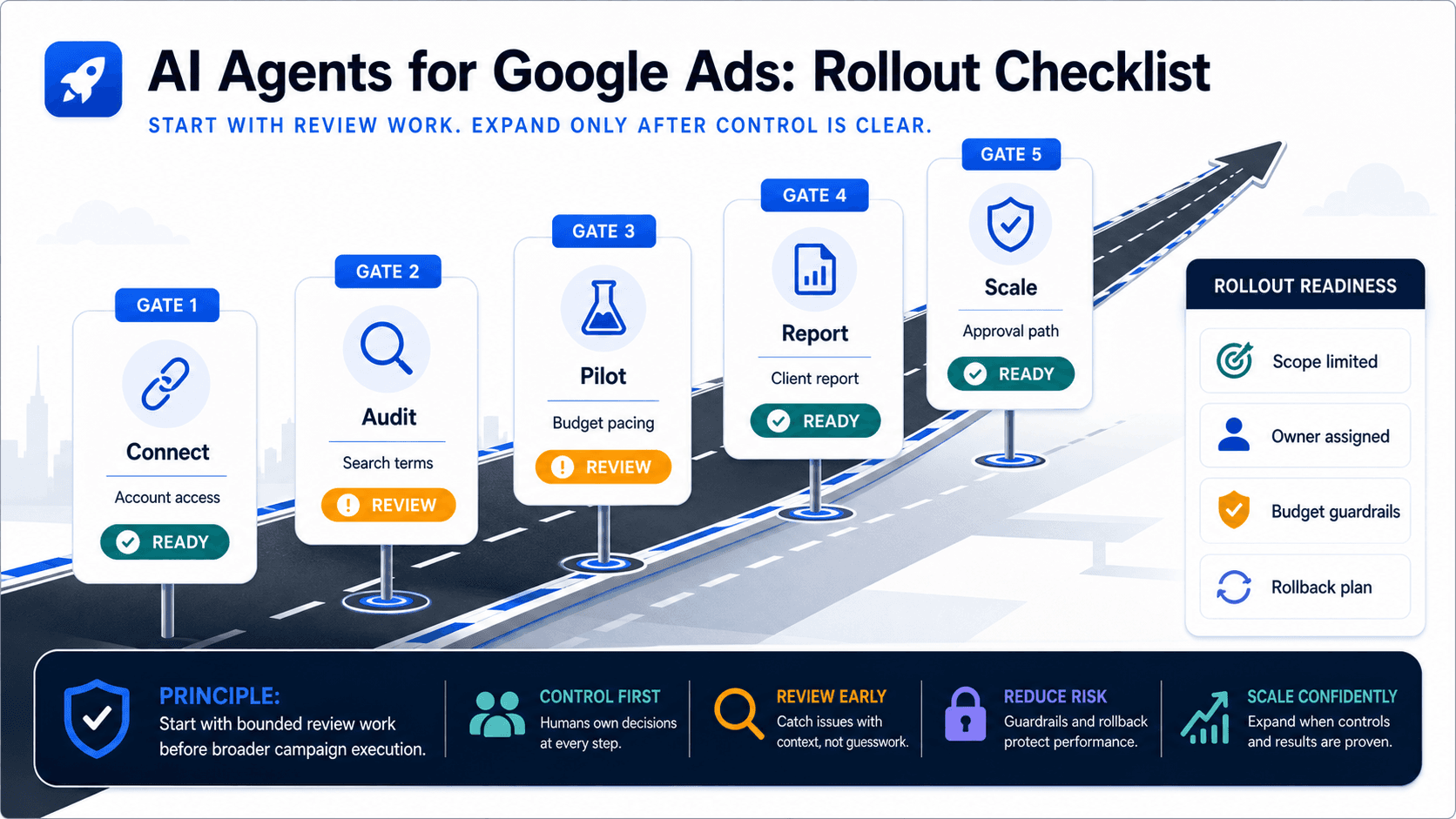
Adoption works best when the first job is narrow enough to measure and repeat.
Use this short rollout checklist for Google Ads AI agents, then continue to the main Google Ads AI agent guide for the full category definition.
Key takeaway
The full category explanation now belongs in the main Google Ads AI agent guide. The useful job here is narrower: help a team plan the first rollout without overextending the agent across every account and every change type on day one.
Start with one recurring Google Ads job, one account or client set, one reporting output, and one human-review rule for higher-impact changes. Expand only after the team can see better speed, clearer reporting, and fewer manual rebuilds.
Reviewed the rollout checklist against the main Google Ads AI agent guide, Google Ads native surfaces, and current Parallel product boundaries so this route supports consolidation instead of competing with the stronger pillar.
- Point broad category intent to the main Google Ads AI agent guide.
- Keep the remaining content focused on a practical rollout checklist.
- Use one recurring Google Ads job as the pilot before expanding across accounts.
For the complete category definition, use the main Google Ads AI agent guide. It explains what the category does, where Parallel fits, and how native Google Ads tools still fit around the agent.
This rollout plan belongs after the team has decided an AI agent belongs in the stack and needs a measured first use case.
- Pick one account, client set, or manager-account segment.
- Choose one recurring job such as search-term review, budget pacing, Recommendations review, PMax reporting, or client reporting.
- Record the current time spent on diagnosis, reporting, and cleanup.
- Require human review for budget, bid, conversion-goal, keyword, targeting, and structure changes.
- Expand only after the first review cycle produces a useful report or summary with less manual cleanup.
Parallel fits the rollout when the team needs Google Ads account context to become a report, sheet, summary, or proposed next step. It is not a reason to skip Google Ads manager accounts, native reporting, Recommendations, or Smart Bidding.
The strongest pilot is a weekly review the team already runs manually. If Parallel reduces review time and produces a clearer output, the team can expand to another account set or job.
Google documentation
Google's current documentation for AI Mode and AI Max built on broad match, Smart Bidding, and responsive search ads.
Official Smart Bidding reference for Google's automated bid optimization systems.
Official overview of AI Max for Search campaigns, including matching, creative, reporting, and controls.
Official reference for Google Ads Recommendations and how they use account history, campaign settings, and trends.
Official reporting reference for Report editor, predefined reports, saved reports, and manager-account reporting.
Official manager-account reference for agencies and teams managing multiple Google Ads accounts from one place.
About Parallel
Current security, data-handling, and connectivity framing.
Company mission and editorial review context behind the published guides.
- Google Ads AI agent: complete guideThe pillar guide covers the category definition, the adoption model, and where the agent fits real Google Ads work.
- Blog homeBrowse every published Google Ads guide from one editorial index.
- ResourcesMove between the definition page, pricing, product walkthrough, and trust pages.
- About Parallel AISee the company mission, editorial standards, and operating principles behind the product.
- SecurityReview the public data-handling, account-connectivity, and approval-control framing used throughout the published guides.
- How AI Agents Help Optimize Google Ads: Reports, Settings, and Review StepsA technical guide to diagnosis, prioritization, and reviewed changes in Google Ads.
- Google Ads AI Agent Pricing: Seats, Account Limits, and Total CostFor testing pricing against account load, team shape, day-to-day fit, and the manual hours still left after rollout.