

Budget Governance
Google Ads Budget Pacing Update 2026: What Changed and What Holds
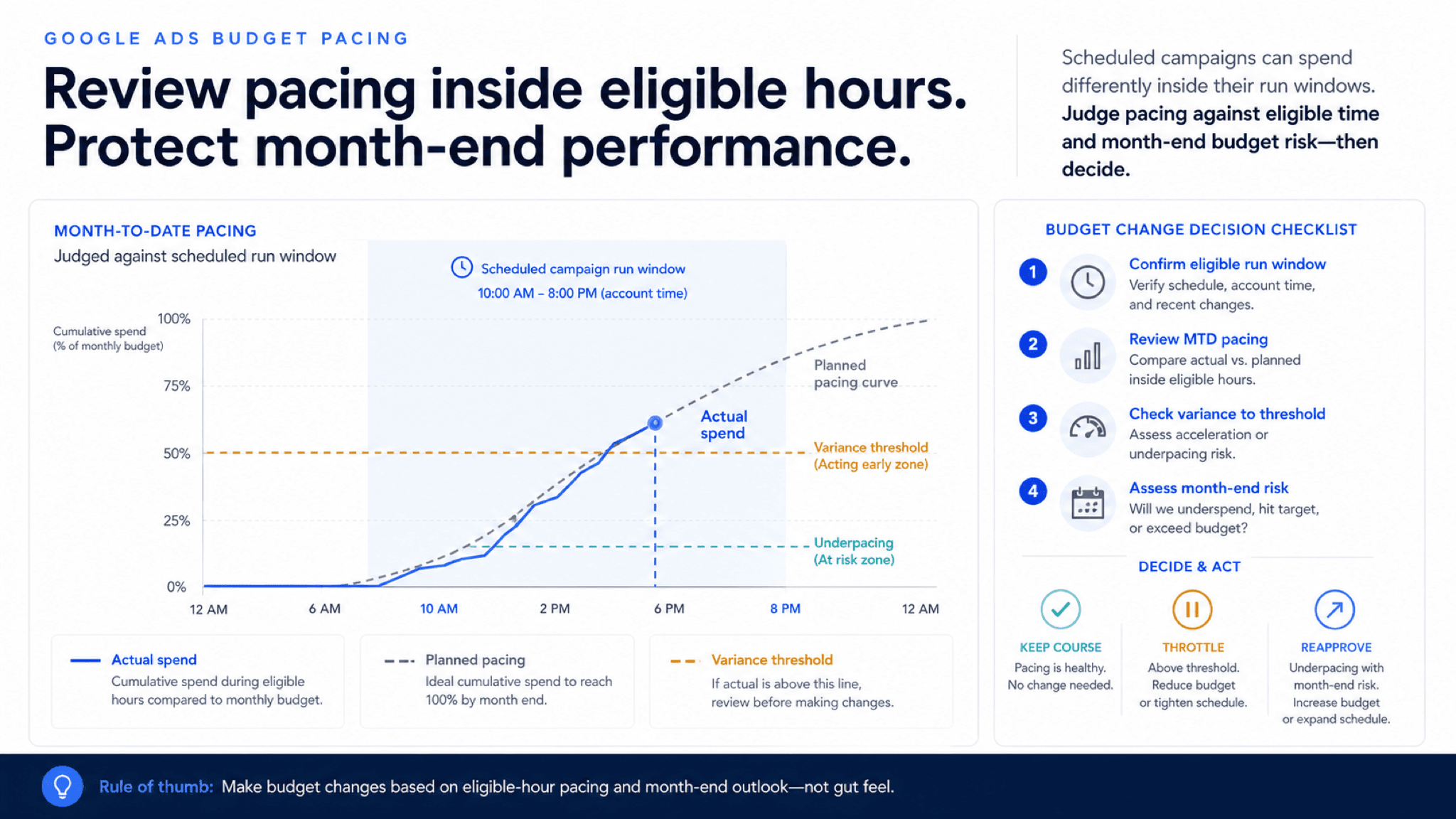
Budget pacing guide for comparing scheduled hours, planned monthly curve, spend acceleration, variance thresholds, and reapproval decisions.
Google changed pacing twice in 2026, but the spending limits stayed put. This guide shows how scheduled hours and demand peaks can bend the spend curve before month end.
Key takeaway
Tuesday morning is when the 2026 pacing changes show up. Spend is ahead of plan, nothing is actually broken, and the first split to make is simple: Google changed where spend lands inside the budget, not the spending limits themselves. In March, campaigns using ad scheduling began pacing harder inside eligible hours. In May, Google announced demand-led pacing for Search and Shopping, which lets spend follow stronger and weaker demand days. Google's budget documentation still says an average daily budget can spend up to 2 times the daily amount on a single day and no more than 30.4 times it in a month.
That means the real review is about curve shape, not rule breaking. Before lowering a budget, compare month-to-date spend with eligible hours, demand peaks, and the plan for the rest of the month. Parallel AI runs that review on connected Google Ads accounts, writes it up in a doc or spreadsheet, and drafts any budget change for a person to approve.
Checked against current product, pricing, trust, and official Google materials so the comparison, buying guidance, and fit criteria stay current and defensible.
- Used Google's May 20, 2026 bidding and budgeting announcement as the baseline for what demand-led pacing changes in Search and Shopping campaigns.
- Used Google Ads Help spending limit and campaign total budget references for the daily and monthly guarantees that did not move.
- Used dated launch coverage to anchor the March 2026 pacing change for campaigns using ad scheduling.
Tuesday morning, the budget column is already ahead of plan and nothing in the account looks obviously wrong. Google did not loosen the limits this year. It changed how quickly spend can arrive inside them, which is enough to make a familiar dashboard feel like a problem before the month is in trouble. The platform answers whether the spend fits the rules. You still answer whether it fits the plan.
DEFINITION
Budget pacing
How Google Ads decides when to spend a budget. Google's spending limits documentation says an average daily budget can spend up to 2 times the daily amount on a single day, and no more than 30.4 times it in a month. Campaign total budgets work differently: a fixed amount spread across set dates. Pacing decides when, inside those guarantees, the spend actually arrives.
Google Ads Help: About spending limits
The first bend landed in March. Campaigns that restrict run hours with ad scheduling now pace harder inside eligible windows, so a campaign that runs weekday mornings can commit more of its month earlier while every single day still stays inside its limit. The daily budget line, which many teams quietly used as a rough stand-in for month progress, becomes a weak signal the moment run hours narrow.
The second bend is broader. Demand led pacing, announced at Google Marketing Live 2026, lets Search and Shopping campaigns spend ahead of demand: heavier on peak days, lighter on slow ones, still inside the monthly budget and daily spending limits. Google frames that as spend following consumers. The March change is mechanical, a scheduling behavior. The May change is strategic: it makes the curve a function of the market's calendar, so the monthly plan now has to say in advance which peaks deserve the chase. The caps stayed put. The curve did not.
Check which campaigns restrict run hours
Once you separate the ceiling from the curve, the math reads differently. Here is a Search campaign with a $300 average daily budget, scheduled weekdays from 9:00 AM to 3:00 PM.
Average daily budget
$300
The example campaign used in this section.
Single-day ceiling
$600
Up to 2 times the daily budget on one day.
Monthly limit
$9,120
30.4 times the daily budget. Unchanged by both updates.
Eligible hours
30/week
Weekdays, 9:00 AM to 3:00 PM in the example schedule.
Under an even spread, this campaign sits near $3,000 month-to-date on day 10 of a 30-day month, about a third of its $9,120 limit. After the pacing changes, the same campaign can plausibly sit at $4,100, around 45 percent, because the system pushed harder inside the 30 eligible hours while demand was strong. Both months can still finish under the limit. The difference is that the second one has already committed almost half its budget with two thirds of the month left.
Whether that is a problem is a business question, not a platform question. If your strongest demand lands early in the month, the faster curve may be buying exactly what you wanted. If you were holding budget for a mid-month promotion or a planned test, the same curve just spent part of your test budget in week one. The rules are Google's. The plan is yours.
What bent in 2026, and what stayed fixed.
| Behavior | Before the updates | After the updates |
|---|---|---|
| Where spend lands | Paced with little regard for schedules and demand peaks | Paced toward eligible hours and stronger demand days |
| Daily budget line as a signal | A rough proxy for month progress | A weak proxy for scheduled and demand-led campaigns |
| Single-day spend ceiling | Up to 2 times the average daily budget | Up to 2 times the average daily budget, unchanged |
| Monthly spending limit | 30.4 times the average daily budget | 30.4 times the average daily budget, unchanged |
With the math in view, the review gets simpler. Run these in order before anyone changes a budget, a schedule, or an expectation outside the account.
- Confirm the budget type first. A campaign total budget, an average daily budget, and a shared budget each tell a different spending-limit story, and the review changes with the budget you are actually looking at.
- Compare month-to-date spend against eligible hours and demand peaks, not calendar days. A campaign on a 30-hour week that spent 45 percent of its monthly limit by day 10 is front-loaded; whether that is a problem depends on what those hours bought.
- Check conversion quality beside the curve. If search term quality, lead quality, and CPA held while spend accelerated, the system may simply be buying the same demand sooner.
- Reread the monthly plan. Pacing drift only means something against named peaks, planned tests, and a tolerance the team agreed to before the curve moved.
Open the spend data for the campaign
A pacing alarm is only real after you compare spend with the hours and demand you actually asked the campaign to chase.
Once the curve is located, most reviews end in one of three calls. Keep, when the faster curve still fits the monthly story and quality held. Adjust, when spend is following demand but CPA, ROAS, or cash flow timing has moved outside the tolerance the team set. Escalate, when the bend is big enough that someone above the account needs to own the tradeoff.
Escalate when
- The new curve changes the likely month end number, not just one noisy day. A $600 Tuesday on a $300 budget is within the rules; sitting at 45 percent of the month on day 10 is a planning conversation.
- Front-loaded spend is crowding out windows you planned to use later, like a mid-month promotion or a scheduled test.
- The fix you want, a lower budget or a narrower schedule, is large enough that a client or finance lead should sign off before it ships.
Hold when
- Spend moved faster while search term quality, lead quality, and CPA held. The curve may be buying the same demand sooner.
- The drift is inside the tolerance you set in the monthly plan, and nothing downstream changed.
- You have not yet compared spend against eligible hours. Escalating off the daily view alone sends a false alarm.
Pacing reviews are one of the jobs Google Ads teams hand to Parallel AI. The agent reads spend, schedule, and conversion data from the connected account, checks month-to-date pacing against eligible hours and demand peaks, and writes the review up in a doc or spreadsheet your team and clients can read. If the call is to tighten a budget or change a schedule, it drafts that change and waits for a person to approve it. That order of operations is the point for budget work. Pacing is rarely a platform mystery. It is a planning question with account evidence attached, which means the write up should exist before the edit does. For a closer look at the product behind this workflow, see , , and . Then, on Monday morning, open the campaigns already ahead of curve, compare spend against eligible hours and planned peaks, and write one keep, adjust, or escalate call before anyone edits the budget.
Google documentation
Google's May 20, 2026 announcement for demand-led pacing, campaign total budgets, and Smart Bidding Exploration expansion.
Google's Help reference for campaign total budget setup, dates, supported formats, and constraints.
Official budget reference for average daily budgets, spending limits, daily costs, shared budgets, and budget reports.
Google's Help reference for daily spending limits, monthly spending limits, served cost, and billed cost.
Additional documentation
Dated launch coverage that explains the February 25, 2026 pacing change and why scheduled campaigns are affected.
- Blog homeBrowse every published Google Ads guide from one editorial index.
- Google Ads AI agent: complete guideThe pillar guide covers the category definition, the adoption model, and where the agent fits real Google Ads work.
- ResourcesMove between the definition page, pricing, product walkthrough, and trust pages.
- About Parallel AISee the company mission, editorial standards, and operating principles behind the product.
- SecurityReview the public data-handling, account-connectivity, and approval-control framing used throughout the published guides.
- Author profileSee the background, specialties, and editorial responsibilities behind the published guides.
- Editorial reviewReview how pricing, trust, and capability claims are checked before public content ships.
- Google Marketing Live 2026: What Google Ads Teams Should Review FirstThe first GML response is a prioritized account review across campaign inputs, not a feature rollout checklist.
- Smart Bidding Exploration for Performance Max and Shopping: Test PlanFor teams enabling Exploration on Search today or preparing for rollout-limited Performance Max and Shopping expansion.
- Journey-Aware Bidding and Lead Quality Readiness for Google AdsQualified leads, converted leads, offline imports, and Data Manager diagnostics need a clean baseline before Search campaigns learn from deeper funnel signals.
- tCPA and ROAS Optimization Across Google Ads Accounts With AIFor tCPA and ROAS diagnosis across multiple Google Ads accounts with review control.