

Multi-Account Optimization Guide
tCPA and ROAS Optimization Across Multiple Accounts
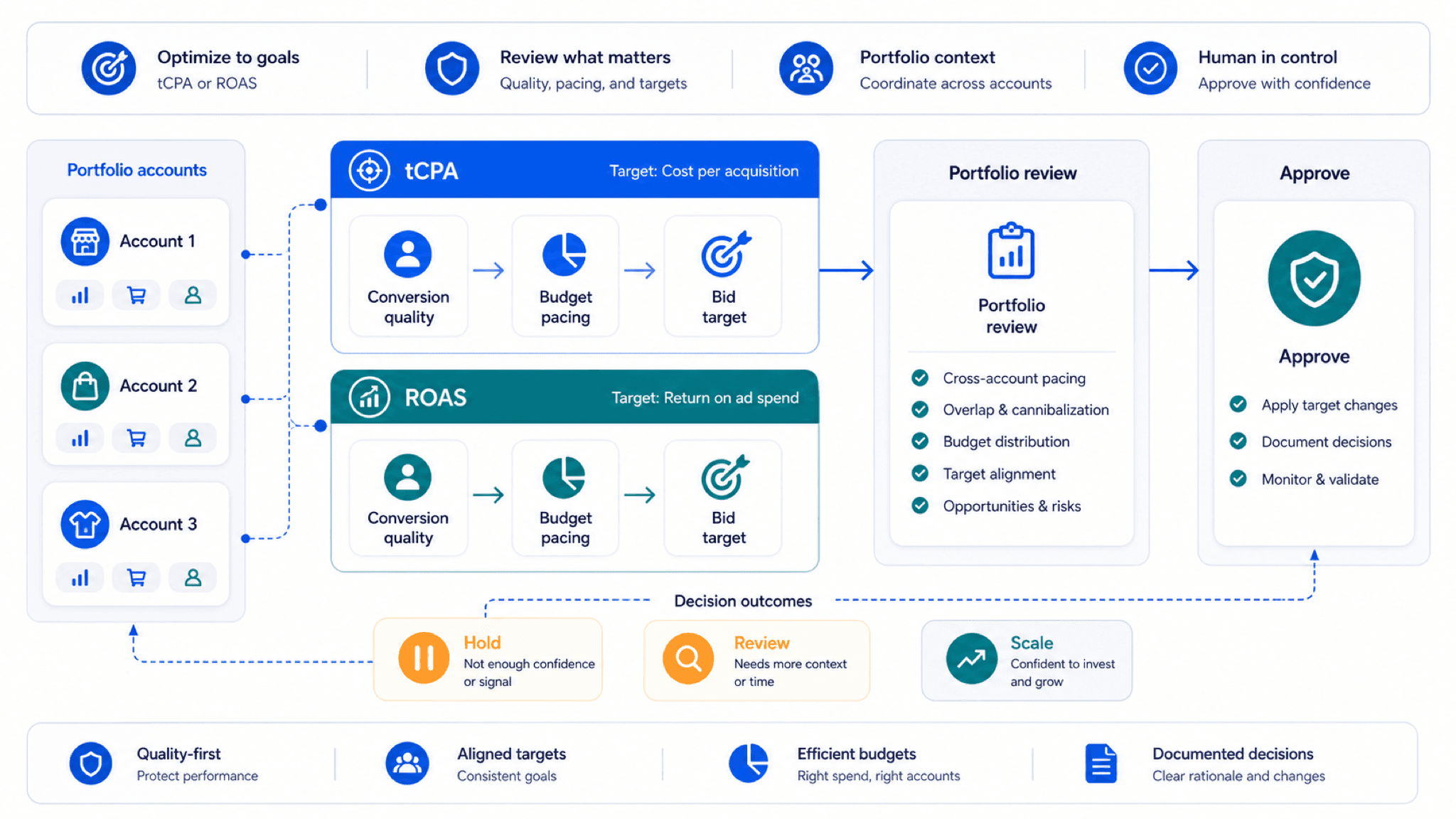
Smart Bidding handles in-platform optimization. Portfolio teams still need diagnosis, reporting, and review control.
tCPA and ROAS targets are portfolio decisions enforced one account at a time. Cross-account optimization is target hygiene before bidding.
Key takeaway
Monday portfolio standup: four accounts show tCPA drift and two show ROAS softness, and everyone wants to talk about bid changes. By the third slide, nobody has compared whether the targets still match each client's conversion setup, budget posture, or recent Change history. Targets are portfolio decisions enforced one account at a time. Optimization across accounts is target hygiene before it is bidding.
For tCPA and ROAS optimization across multiple Google Ads accounts, the first job is prioritization. The team needs to rank which account has the most spend at risk, which efficiency movement is meaningful, and which likely cause is supported by account context.
Parallel fits when the work needs to move from connected-account diagnosis into a sheet, report, or recommendation a person can review. Smart Bidding and Google Ads native controls remain the in-platform optimization layer. Drafted target, budget, and conversion-goal changes wait for human approval before they affect live campaigns.
Checked against current product, pricing, trust, and official Google materials so the explanation stays tied to the live product and current Google Ads context.
- Google Smart Bidding documentation is the baseline for target CPA and target ROAS behavior.
- Portfolio review was framed as ranking and diagnosis before action planning.
- Human review stays explicit for budget, target, conversion-goal, and structure changes.
A single-account tCPA issue is usually diagnosis. A portfolio issue is prioritization first, because every target change still lands in one account at a time.
DEFINITION
Target hygiene
The practice of confirming that target CPA, target ROAS, conversion actions, value rules, and budget posture still match each account's commercial goal before Smart Bidding is blamed for the movement. Google's Smart Bidding Help page describes how automated strategies pursue the targets you set.
Google Ads Help: About Smart Bidding
The team has to decide which account deserves attention, which movement is material, and which likely cause is strong enough to package for review. Jumping straight to bid or target changes across six accounts is how portfolios synchronize mistakes.
A useful AI workflow should compare accounts, explain likely causes, and produce a report or sheet that makes the next review faster. Black-box bid nudges without target context usually create a second cleanup job.
Illustrative portfolio: eight linked accounts, two with tCPA 22 percent above their 30-day norm, one budget-limited Brand Search account driving most of the spend at risk. The numbers are illustrative. The ranking logic is not.
AI Mode and AI Max accounts still follow the same hygiene rule. Automated matching does not remove the need to confirm targets and conversion inputs before you tune bids.
Seasonality belongs in the likely-cause row. Portfolio panic often starts when a normal seasonal dip is treated like a broken target.
Landing-page and form changes belong there too. tCPA can move when the post-click experience changes even if auction conditions stayed stable across the portfolio.
Hygiene first. Bidding second.
Once target hygiene is the frame, the checklist is a prioritization tool, not a bidding worksheet.
Google's manager account documentation explains linking and shared administration. Portfolio diagnosis still requires your team's ranking logic: spend at risk beats vanity efficiency charts.
Compare efficiency movement against recent norms, not only yesterday's spike. Smart Bidding reacts to auction conditions. Your job is to decide whether the target still makes sense for the conversion setup underneath it.
Name the review action precisely. "Fix ROAS" is not a portfolio ticket. "Review target ROAS on PMax campaign X after conversion value rule change on date Y" is.
Search term drift can move tCPA without any target edit. Portfolio reviews that skip query quality often chase bid changes that treat symptoms.
Conversion action changes are the silent driver in multi-account portfolios. One imported action shift can make efficiency look broken across several linked accounts before anyone opens the conversion summary.
| Review area | What to inspect |
|---|---|
| Budget at risk | Spend exposed if the issue continues and whether the account is budget-limited. |
| Efficiency movement | tCPA or ROAS change relative to recent account norms, not only a one-day spike. |
| Likely cause | Conversion action changes, bid strategy changes, search term drift, budget changes, landing-page issues, or seasonality. |
| Review action | The specific target, budget, campaign, conversion action, or report that needs a human decision. |
The portfolio question is which account first, not which bid button.
Hygiene work only sticks when the standup format forces ranking before bid talk.
Open with spend at risk, not with efficiency charts. Charts without ranking turn every standup into a tour of anxiety.
Assign one owner per ranked account before the meeting ends. Shared diagnosis without ownership is how portfolios stall.
Close with the smallest test each account will run before the next target move. Tests are part of hygiene when conversion lag is still catching up.
Document hold decisions with the same rigor as change decisions. A hold is often the right portfolio call when data is still incomplete.
Ranking meetings beat bid meetings.
If target hygiene is the job, the tool must compare connected accounts and finish in something approvers can sign.
Parallel supports teams that need to compare more than one Google Ads account and decide which tCPA or ROAS issue matters first. The agent reads connected account context, explains movement against conversion actions, budgets, search terms, and Change history, then drafts a sheet, summary, or report for review.
Budget, target, conversion-goal, and structure changes stay visible before implementation. Smart Bidding remains the in-platform optimization layer. The agent helps the team compare accounts, explain movement, and package next steps before higher-impact changes are made.
The output should name the ranked account, the pattern break, and the proposed next step another lead can approve without re-diagnosing the portfolio.
See AI tool for managing multiple Google Ads accounts. On Monday morning, sort linked accounts by spend at risk where tCPA or ROAS moved more than your team's tolerance versus the 30-day norm, and assign owners before anyone opens bid strategy settings.
Bring one sheet column for target hygiene: current target, last change date, conversion action notes, and budget posture. Portfolio standups get shorter when those fields are filled before the meeting starts.
When one account needs a target change, record the peer accounts that should not be copied. Hygiene failures are contagious in portfolios that share playbooks without sharing context.
Portfolio optimization is target hygiene written down.
Google documentation
Google's main reference for manager-account structure, shared access, and multi-account administration.
Google's core reference for bidding automation, target-setting, and when performance diagnosis still needs human review.
Google's current overview of native AI Mode and AI Max features and where external workflow tools sit around them.
Google's current business-learning reference for conversion quality, reporting reliability, and measurement discipline.
About Parallel
Current security, data-handling, and connectivity framing.
Company mission and editorial review context behind the published guides.
- Blog homeBrowse every published Google Ads guide from one editorial index.
- Google Ads AI agent: complete guideThe pillar guide covers the category definition, the adoption model, and where the agent fits real Google Ads work.
- ResourcesMove between the definition page, pricing, product walkthrough, and trust pages.
- About Parallel AISee the company mission, editorial standards, and operating principles behind the product.
- SecurityReview the public data-handling, account-connectivity, and approval-control framing used throughout the published guides.
- What Is Parallel AI? A Clear Definition for Google Ads TeamsOfficial definition page for Parallel AI, with brand clarity and Google Ads fit.
- Pricing for Google Ads TeamsPricing, account-limit, and trial-policy page for Parallel AI.
- How Parallel AI Works for Google Ads TeamsProduct walkthrough for how Parallel AI fits into Google Ads reviews and approvals.
- Google Ads AI Agent for Agencies: Reviews, Reports, and ControlsFor agencies that need a repeatable multi-account review and reporting model that cuts rework without loosening approvals.
- AI Agent That Connects to Google Ads for Campaign Audits: What It Should CheckFor teams that need a Google Ads audit agent for Search, PMax, Shopping, reports, and human review.
- How to Find Wasted Spend in Google Ads With AIFor accounts that need lower wasted spend without overblocking useful traffic.
- What Are AI Agents for Google Ads? Start With the Main GuideShort path for buyers looking for the full Google Ads AI agent category guide.
- Best AI Agent for Google Ads Audits and Reporting: What PPC Teams Should CompareFor teams comparing Google Ads AI agents for audits, reports, and reviewed next steps.