

Ecommerce Use Case
Google Ads AI Agent for Ecommerce: Search Terms, Shopping, and PMax Review
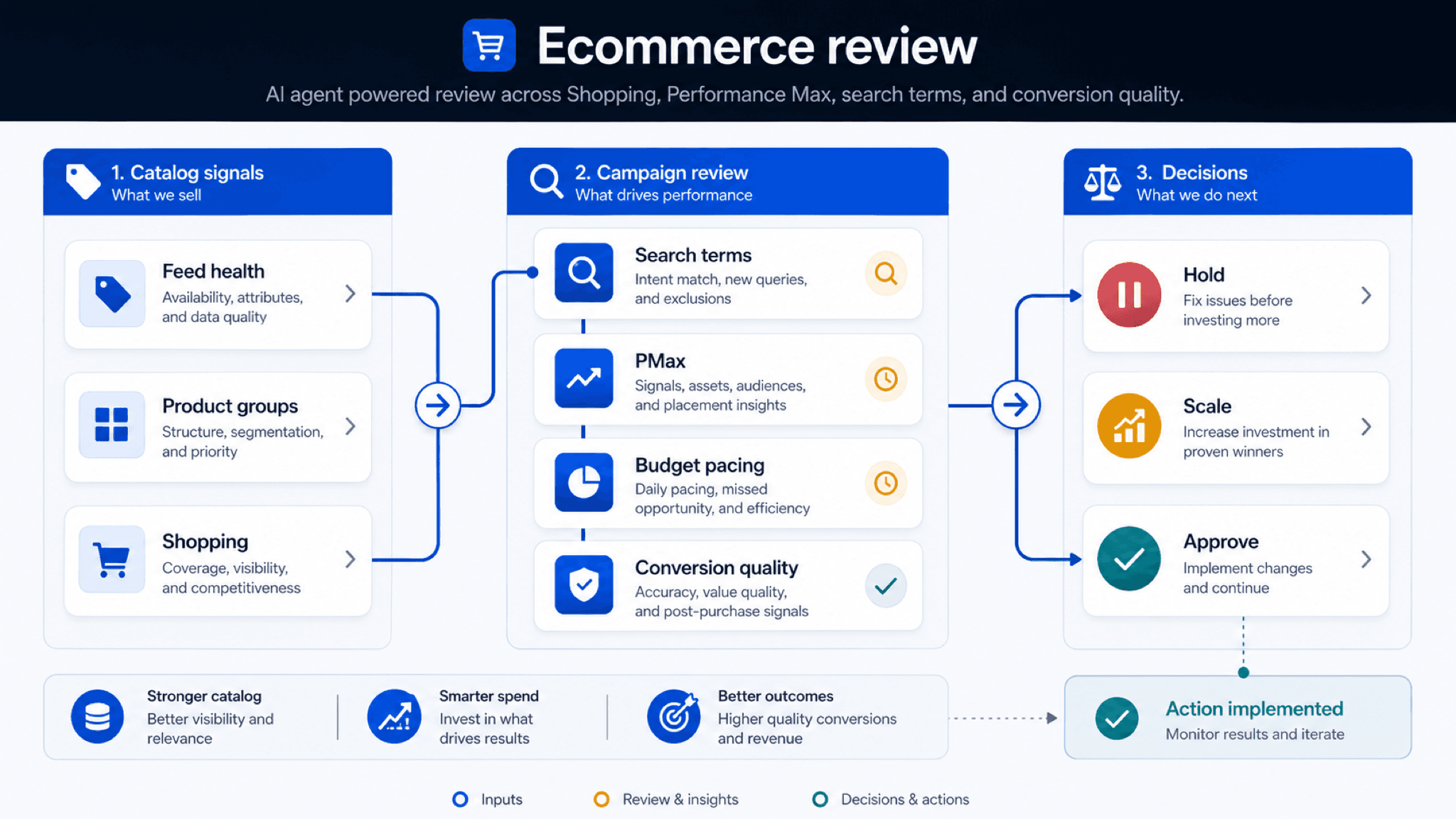
Ecommerce review works best when the team connects query quality, product coverage, and revenue quality before choosing the next action.
See why ecommerce Google Ads problems usually start in catalog and feed data, then run one weekly Search, Shopping, Merchant Center, and PMax review loop.
Key takeaway
Ecommerce Google Ads performance usually breaks across connected surfaces: the search terms report, Shopping product data, Merchant Center status, Performance Max asset groups and listing groups, budget pacing, conversion value, and product-margin context. A useful agent helps when the team needs those signals reviewed together instead of in separate meetings.
Parallel AI handles this kind of Google Ads work as an agent on the connected account: it runs the analysis, writes the report or spreadsheet, and drafts any account changes for a person to approve.
The strongest setup is hybrid. Google Ads, Merchant Center, Shopping, Performance Max, Smart Bidding, and AI Max still handle in-platform execution. The question is whether the review layer can connect those surfaces early enough for merchandising, paid media, and leadership to act in the same week.
Checked against current product, pricing, trust, and official Google materials so the explanation stays tied to the live product and current Google Ads context.
- One recurring review spans feed, Search, Shopping, and PMax.
- Prioritize faster triage and cleaner weekly action sequencing over generic AI novelty.
- High-impact spend and structural changes stay inside an approval-required workflow.
- Product fit here means real Google Ads jobs: review speed, shared reporting, and account changes that stay under human control, not generic AI helper claims.
Monday morning, Shopping spend looks steady, the budget did not collapse, and yet a top segment is down. The campaign view says demand softened. Merchant Center and the product feed say something else entirely: product eligibility slipped, item coverage dropped, or price and availability mismatches stopped surfacing the products the account needed most. In ecommerce, that is a normal failure pattern. Campaign performance is often downstream of the feed and catalog.
That is why ecommerce teams need a different workflow. Search terms, Shopping product data, Merchant Center status, Performance Max asset groups and listing groups, budget pacing, conversion value, and product-margin context all belong to the same weekly diagnosis even though they live on different screens. A campaign-only read sees the symptom late.
Merchant Center disapprovals, product eligibility gaps, item coverage loss, and price and availability mismatches can suppress volume before the performance loss is obvious. Shopping and Performance Max move with product mix, inventory, and promotion timing. Search-term governance gets harder as SKU count and campaign complexity scale. Weekly priorities shift with margin pressure as much as media metrics. Campaign reporting does not explain any of that by itself.
In ecommerce, campaign performance is downstream of the feed and catalog.
Once that upstream view is clear, the failure of manual workflow looks predictable. Feed issues, disapprovals, and product eligibility problems are found too late, so recovery becomes reactive. Shopping and Performance Max changes are reviewed inconsistently across the week because no one owns the combined picture. Query governance falls behind account growth because it is treated as separate from merchandising pressure instead of part of the same revenue system.
The result is that teams set priorities by urgency instead of likely business impact. The loudest symptom wins the meeting even when it is only a downstream effect of a catalog or eligibility problem somewhere else. That is not a campaign problem. It is a review-order problem.
When feed checks and campaign checks are reviewed apart, the team spends the week chasing echoes.
Because the symptoms arrive downstream, the team needs one loop that starts upstream enough to catch them before the week is gone.
DEFINITION
Weekly ecommerce operating loop
One recurring review that connects feed health, Search, Shopping, Performance Max, budgets, and revenue signals before the team decides what deserves action first.
Marketing reference
Monday triage asks what is suppressing revenue this week, not which campaign looks strange first. Mid-week execution packages action with rationale and expected direction so merchandising and paid media are not arguing from different evidence. End-week review checks what improved and what still needs intervention before the next cycle starts.
The point of the loop is not process for its own sake. It is to keep campaign symptoms tied to feed and catalog causes long enough for the team to make one ranked plan instead of three disconnected fixes.
A loop earns its keep when it makes the feed or catalog problem visible before the campaign metric hardens into the week's story.
| Phase | Core question | Output |
|---|---|---|
| Monday triage | What is suppressing revenue this week? | Ranked issue list across feed, query, budget, and assets |
| Mid-week execution | What should change now? | Action pack with rationale and expected direction |
| End-week review | What improved and what still needs intervention? | Outcome summary with next-step recommendations |
Google documentation·Accelerate with Google
Powering Modern Commerce with Merchant Center
Use this official commerce guide when a page needs a Google-owned reference for Merchant Center, retail media assets, and merchandising work.
Open commerce guideOnce the weekly loop exists, the next job is to stop treating each performance swing like a fresh mystery.
The table works because ecommerce failure patterns repeat. Volume drop with stable spend often points to feed friction or product eligibility issues. Spend growth without return lift often points to query mismatch or weak priority sequencing. PMax volatility often points to asset-group and product-mix instability. The dashboard does not lie by saying the numbers changed. It lies by omission when it does not show the upstream mechanism clearly enough to set priority.
Pattern recognition is how the team keeps one symptom from stealing the whole week.
A good problem map turns surprise into order before it turns into action.
| Problem pattern | Likely root cause | Workflow response |
|---|---|---|
| Volume drop with stable spend | Feed friction or product eligibility issues | Run feed triage and rank the blockers by coverage impact |
| Spend growth without return lift | Query mismatch or weak priority sequencing | Tighten query governance and rebalance the weekly plan |
| PMax volatility | Asset-group and product-mix instability | Run a structured PMax review with staged changes |
From there, feed review and Performance Max review need to live together because they are often the same investigation at different distances from the catalog. A change in product feed quality, item coverage, or asset quality can surface later as volatility in Search, Shopping, or PMax performance. Looking at one without the other makes the team precise inside the wrong frame.
That is why separate meetings create false confidence. The team leaves feeling organized while the real cause stays split across calendars, surfaces, and owners. One loop is slower to build and much faster to trust.
Different surfaces do not mean different problems.
The weekly loop also has to respect the merchandising calendar. Promotion launches, inventory gaps, and margin shifts change which issue deserves the week first. A feed fix that can wait during stable inventory may become the entire story during a launch window. Query governance that matters in a steady week may fall behind a catalog coverage emergency when stock changes fast.
The more seasonal the catalog, the more important it is that the workflow packages rationale for merchandising, paid media, and leadership instead of surfacing raw signals only. In ecommerce, calendar pressure is not context around the work. It is part of the work.
The right priority is the one the calendar makes expensive to miss.
That calendar pressure is easiest to see when the same account is forced to choose different first moves under different commercial conditions.
Promotion launch, inventory gap, and margin pressure all reorder the week differently because they change what the feed or catalog problem costs if ignored. That is why the team is not really choosing between feed, Search, and PMax. It is choosing which upstream problem has the right to dominate attention now.
A scenario table is useful only if it changes the first move on Monday.
The order matters because ecommerce mistakes are often sequencing mistakes before they are tactic mistakes.
| Scenario | What moves up first | Why the order changes |
|---|---|---|
| Promotion launch with stable inventory | Query governance and asset review | The risk is wasted demand capture or weak messaging, not stock suppression. |
| Inventory gap on a top segment | Feed eligibility and catalog coverage checks | Traffic quality matters less if the feed cannot expose the right products consistently. |
| Margin pressure during a seasonal spike | Segment-level budget pacing and PMax review | The workflow has to protect profitability, not just headline demand volume. |
Because sequence is the real problem, the pilot has to prove sequence on one segment before the team expands the loop account-wide.
01
Days 1-3: baseline the current weekly loop
Capture where feed, query, and reporting delays happen now so the workflow improvement has a real baseline.
02
Days 4-12: pilot one account segment
Run one ecommerce segment through the AI-assisted loop while keeping high-impact actions in approval mode.
03
Days 13-21: refine and expand
Standardize the triage prompts and weekly summary format, then decide whether to expand to additional segments.
One segment is enough to prove whether the team can get upstream sooner.
After the pilot runs, the best measurement framework is simple. Track time-to-diagnosis for weekly anomalies across feed, query, and budget signals. Measure time-to-action on prioritized fixes, not just raw task completion. Log rework rate on optimization plans and reporting outputs after the workflow packages the week. Track stakeholder confidence in the weekly decision quality, especially when inventory or margin pressure changes priorities.
This is also where Parallel fits naturally for ecommerce work. It works from the connected Google Ads account, finishes the weekly review in docs, spreadsheets, and reports merchandising and paid media can act on together, and drafts higher-impact account changes that wait for a person to approve. That structure matters because the whole point is to move upstream sooner without losing human control at the point of change.
A good rollout shows that the team found the feed or catalog problem before campaign reporting spent another week explaining it.
Even a strong loop still breaks in predictable ways. Catalog complexity can be so high that the team cannot agree on which segment should define the pilot first. Merchandising and media can work from different weekly calendars, so no one trusts the priority order once the meeting ends. Feed governance can be weak enough that the same blocker keeps reappearing after the workflow has already flagged it.
Those failures rarely mean the diagnosis was wrong. They mean the business has no shared view of feed priorities, product eligibility, and item coverage, and until one exists the loop keeps finding the same problem with better language.
A loop cannot outrun a business that disagrees about feed priorities.
The common mistakes all reduce to that habit. Teams treat feed, Search, PMax, and reporting as disconnected workflows. They pilot without a fixed weekly cadence and then blame the tool when the loop never stabilized. They measure only speed while ignoring whether decision quality improved. Or they expand account-wide before one segment proves the operating loop is stable.
Each mistake keeps the team downstream. It turns a feed or catalog problem into a campaign debate, which is exactly how ecommerce reviews end up feeling busy and inconclusive at the same time.
On Monday morning, choose one live segment, compare Merchant Center status, product coverage, search terms, PMax behavior, and budget pacing in one pass, and ask which upstream problem deserves the week first.
Google documentation
Official reference for using the search terms report to review which searches triggered ads and identify keyword or negative keyword updates.
Official Performance Max reference for campaign scope, inventory, goals, asset groups, and optimization context.
Official Shopping ads reference for product data, Merchant Center, and how Shopping ads appear across Google surfaces.
Official listing-groups reference for segmenting products inside Performance Max retail campaigns.
Official budget reference for average daily budgets, spending limits, daily costs, shared budgets, and budget reports.
Google's current documentation for AI Mode and AI Max built on broad match, Smart Bidding, and responsive search ads.
Official Smart Bidding reference for Google's automated bid optimization systems.
Official overview of AI Max for Search campaigns, including matching, creative, reporting, and controls.
Additional documentation
Current practitioner guidance on search-term, placement, channel, and device reporting for ecommerce teams running Performance Max.
Recent independent analysis of AI Max tradeoffs, useful for framing where broader reach can create efficiency risk.
- Blog homeBrowse every published Google Ads guide from one editorial index.
- Google Ads AI agent: complete guideThe pillar guide covers the category definition, the adoption model, and where the agent fits real Google Ads work.
- ResourcesMove between the definition page, pricing, product walkthrough, and trust pages.
- About Parallel AISee the company mission, editorial standards, and operating principles behind the product.
- SecurityReview the public data-handling, account-connectivity, and approval-control framing used throughout the published guides.
- How AI Agents Help Optimize Google Ads: Reports, Settings, and Review StepsA technical guide to diagnosis, prioritization, and reviewed changes in Google Ads.
- Google Ads Automation vs AI Agents: Rules, Native AI, and Agent-Led ReviewHelpful when a team needs to sort Google Ads work into threshold-based automation, auction-time optimization, or account-level diagnosis with approval.
- Google Ads AI Agent for Agencies: Reviews, Reports, and ControlsFor agencies that need a repeatable multi-account review and reporting model that cuts rework without loosening approvals.
- AI Max Expansion After GML 2026: What to Audit Before You Adopt ItHelpful when Google Ads teams need to audit AI Max readiness without losing account-level review and approval.