

Implementation Guide
Google Ads Automation vs AI Agents: Rules, Native AI, and Agent-Led Review
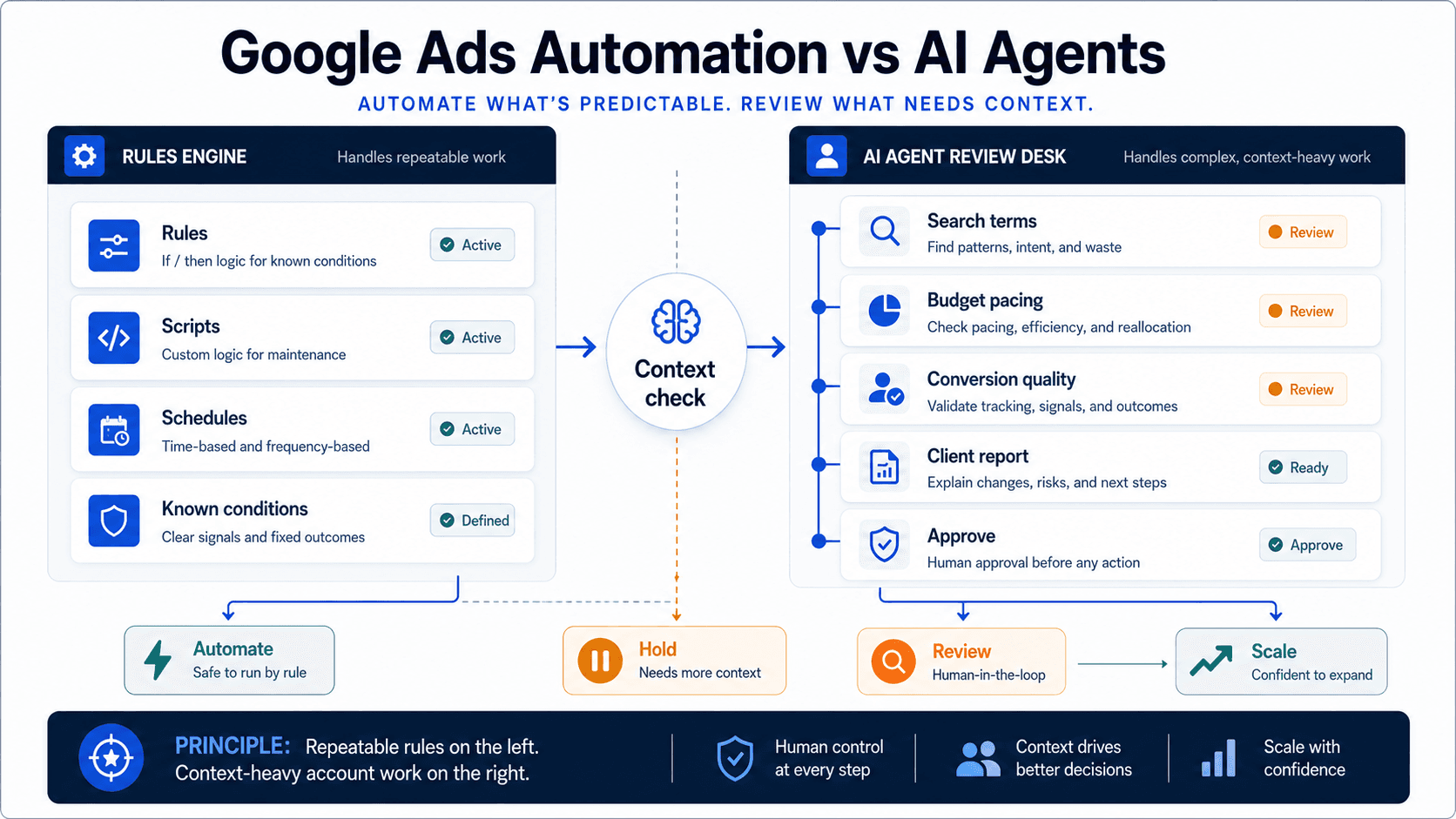
Match the job to the system and keep higher-impact changes under human review.
Sort Google Ads work by what each system can see: rules see thresholds, Smart Bidding sees the auction, an AI agent sees the account. Where each breaks, and what needs approval.
Key takeaway
A rule fires on Tuesday because 7-day CPA looks broken. By Thursday the late conversions arrive and the number settles down. That is the cleanest way to see the category split: rules know thresholds, Smart Bidding knows auctions, and an AI agent knows the account.
Keep all three, but give each the job its context can support. Rules handle fixed instructions. Smart Bidding handles auction-time bid setting and native optimization. Parallel AI handles the work that needs account history, diagnosis, a written report or spreadsheet, and drafted changes held for human approval.
Built from Google's current automated rules and Smart Bidding documentation, then rewritten around the question that actually separates the categories: what can this system see when it acts, and who checks the result.
- Used Google Ads Help automated rules and Smart Bidding references for what each native surface does and where its view stops.
- Classified recurring agency and in-house jobs by input stability, account context required, and downside risk of a wrong change.
- Kept Parallel's role grounded in the live product: connected account analysis, finished docs and reports, and drafted changes held for human approval.
The opening rule failure widens into a better routing question: what can this system actually see at the moment it acts? The categories stop fighting each other once you treat them as different kinds of context.
DEFINITION
Google Ads automation
The platform's native execution layer: automated rules that make scheduled account changes when chosen conditions are met, scripts for custom logic, and Smart Bidding strategies (Target CPA, Target ROAS, Maximize conversions, Maximize conversion value) that set bids per auction using signals available at auction-time.
Google Ads Help: automated rules; Smart Bidding
A rule sees one condition at one moment. That narrow view is exactly why it is useful: the checks that should run every week without fail or argument belong to rules and scripts. The moment the question requires context the rule was never given, like whether conversion lag or a tracking outage explains the number, it still acts.
Smart Bidding sees the auction. Google's bidding strategies read auction-time signals such as device, location, time, audience, and combinations no spreadsheet could recompute fast enough. What they optimize toward is whatever target you handed them, which is why a wrong Target CPA or a polluted conversion action gets optimized just as efficiently as a right one. The system is superb at the how and silent on whether the goal still deserves the bid.
The agent sees the account. It reads performance data, change history, budgets, and search terms across the connected account, which is what diagnosis, prioritization, and reporting actually require. That wider context comes with an obligation the other two systems do not carry: the conclusion has to be legible, and the proposed change has to wait for an approver. The hardest Google Ads jobs do not fail for lack of automation. They fail when the system acting cannot see enough context.
| System | What it can see | Best Google Ads job | Where the view runs out |
|---|---|---|---|
| Rules and scripts | A fixed condition right now | Scheduled checks, pauses, labels, alerts, budget caps | Acts on numbers it cannot interpret, like conversion lag |
| Smart Bidding and native AI | Auction time signals on a live impression | Bid setting toward Target CPA or ROAS, matching, asset adaptation | Optimizes toward stale targets and bad conversion data without stopping |
| AI agent | The connected account: performance, history, context | Diagnosis, prioritization, reports, drafted changes for approval | Needs explicit limits, and account changes must wait for a person |
That difference in view is easiest to feel in one rule nearly every team has written: pause keywords whose 7-day CPA exceeds $80 on a $50 target. Most weeks it is harmlessly useful. Now run it on the Tuesday after a holiday weekend. Conversions in this account typically land 2 to 3 days after the click, so Monday's clicks show spend with no conversions yet. The 7-day CPA reads $96, the rule pauses 14 keywords, and by Thursday the late conversions arrive and the true CPA settles at $54. Nothing malfunctioned. The rule did exactly what it was told by a number that was not done cooking.
Smart Bidding fails differently. It reacts to the conversion data it receives, so the same lag pulls bids down for a few days, then recovery follows automatically. The damage is softer but the cause is identical, and neither system can tell you what happened. The explanation lives in the relationship between click dates, conversion lag, and the calendar, which is account context, not a threshold.
This is the boundary in practice. The fix is not a cleverer rule with more conditions. It is routing the question to a system that can see the whole picture: compare this week against the account's lag pattern, check whether tracking changed, and say in writing whether the spike is real. If the job needs memory, a threshold is the wrong tool.
Once you have seen the misfire, the routing rule gets simpler. Ask whether the job can be done correctly knowing only a threshold, only the auction, or whether it needs the account's history and the business behind it.
Keep it in rules or native AI when
- The same input should always produce the same action, like labeling search terms with zero conversions over 30 days.
- The job lives inside the auction: bid setting, match decisions, and asset adaptation belong to Smart Bidding and native controls.
- A wrong action is cheap and self-correcting, like an alert that occasionally flags a false positive.
Route it to the agent when
- Acting correctly requires history or context, like distinguishing real CPA drift from conversion lag.
- The output is something a person reads: a client report, a budget recommendation, or an audit with priorities.
- A wrong change is expensive enough that someone must approve it, like budget moves or structural edits. The agent drafts; a person ships.
When the job needs history, explanation, or a signature, start above the execution layer.
After the routing rule is clear, Parallel AI takes the layer that rules and Smart Bidding cannot see cleanly: recurring account reviews, search term and budget investigations, performance diagnosis, and reporting. The agent works from the connected account's actual data, not from screenshots or exports, and it finishes the job in a doc or spreadsheet someone can read, challenge, and forward.
The approval loop is the design decision that makes the hybrid model safe. When the review ends in an account change, a budget adjustment, a pause list, or a negative keyword set, the agent drafts the change and waits. Whoever owns the account approves, edits, or rejects it. Automation executes instantly by design; the agent deliberately does not, because the work it handles is exactly the work where judgment earns its keep.
In practice the systems are complementary, not rivals. Keep the rules that work. Keep Smart Bidding on the campaigns where it outperforms manual bids, which Google's own documentation explains is most of them. See what the Google Ads agent does and what switching saves against manual review. Then point the agent at the layer above: deciding what matters, explaining what changed, and producing the next reviewed step. Fast execution is valuable. Legible judgment is rarer.
01
Inventory one week of recurring work
List every recurring task the team touched: budget checks, search term reviews, Recommendations triage, client updates. Mark each by the view it required: a threshold, the auction, or the account.
02
Route by view, then run both weeks
Leave threshold jobs in rules and auction jobs in Smart Bidding. Hand the account context jobs to the agent and let it produce the same reviews and reports the team produced manually.
03
Compare the reports, not the demos
Put the agent's account review next to last month's manual one. Judge time spent, what each caught, and whether the drafted next steps were approvable as written.
On Monday morning, pick one recurring review, route it by what it needs to know, and compare the written output two weeks later.
Google documentation
Google's current documentation for AI Mode and AI Max built on broad match, Smart Bidding, and responsive search ads.
Official Smart Bidding reference for Google's automated bid optimization systems.
Google's reference for scheduled, condition-based account changes: what rules can act on and when they run.
Official overview of AI Max for Search campaigns, including matching, creative, reporting, and controls.
Details on search term matching, text customization, final URL expansion, and related AI Max controls.
Official reference for Google Ads Recommendations and how they use account history, campaign settings, and trends.
Official reporting reference for Report editor, predefined reports, saved reports, and manager-account reporting.
Official budget reference for average daily budgets, spending limits, daily costs, shared budgets, and budget reports.
Additional documentation
Practical review of which Google Ads AI features are safe starting points and which ones still require tighter human oversight.
Shows how mature PPC teams layer multi-condition automation, alerts, and review steps beyond simple native rules.
About Parallel
Current security, data-handling, and connectivity framing.
Company mission and editorial review context behind the published guides.
- Blog homeBrowse every published Google Ads guide from one editorial index.
- Google Ads AI agent: complete guideThe pillar guide covers the category definition, the adoption model, and where the agent fits real Google Ads work.
- ResourcesMove between the definition page, pricing, product walkthrough, and trust pages.
- About Parallel AISee the company mission, editorial standards, and operating principles behind the product.
- SecurityReview the public data-handling, account-connectivity, and approval-control framing used throughout the published guides.
- Ask Advisor and AI Agents After GML 2026: Native Google Help vs Team ReviewFor teams deciding what belongs in Ask Advisor, native Google AI, or agent-led account review after GML 2026.
- How AI Agents Help Optimize Google Ads: Reports, Settings, and Review StepsA technical guide to diagnosis, prioritization, and reviewed changes in Google Ads.
- AI Max Expansion After GML 2026: What to Audit Before You Adopt ItHelpful when Google Ads teams need to audit AI Max readiness without losing account-level review and approval.