

Creative Decision Guide
Should You Opt Out of AI Voice-Over in Performance Max?
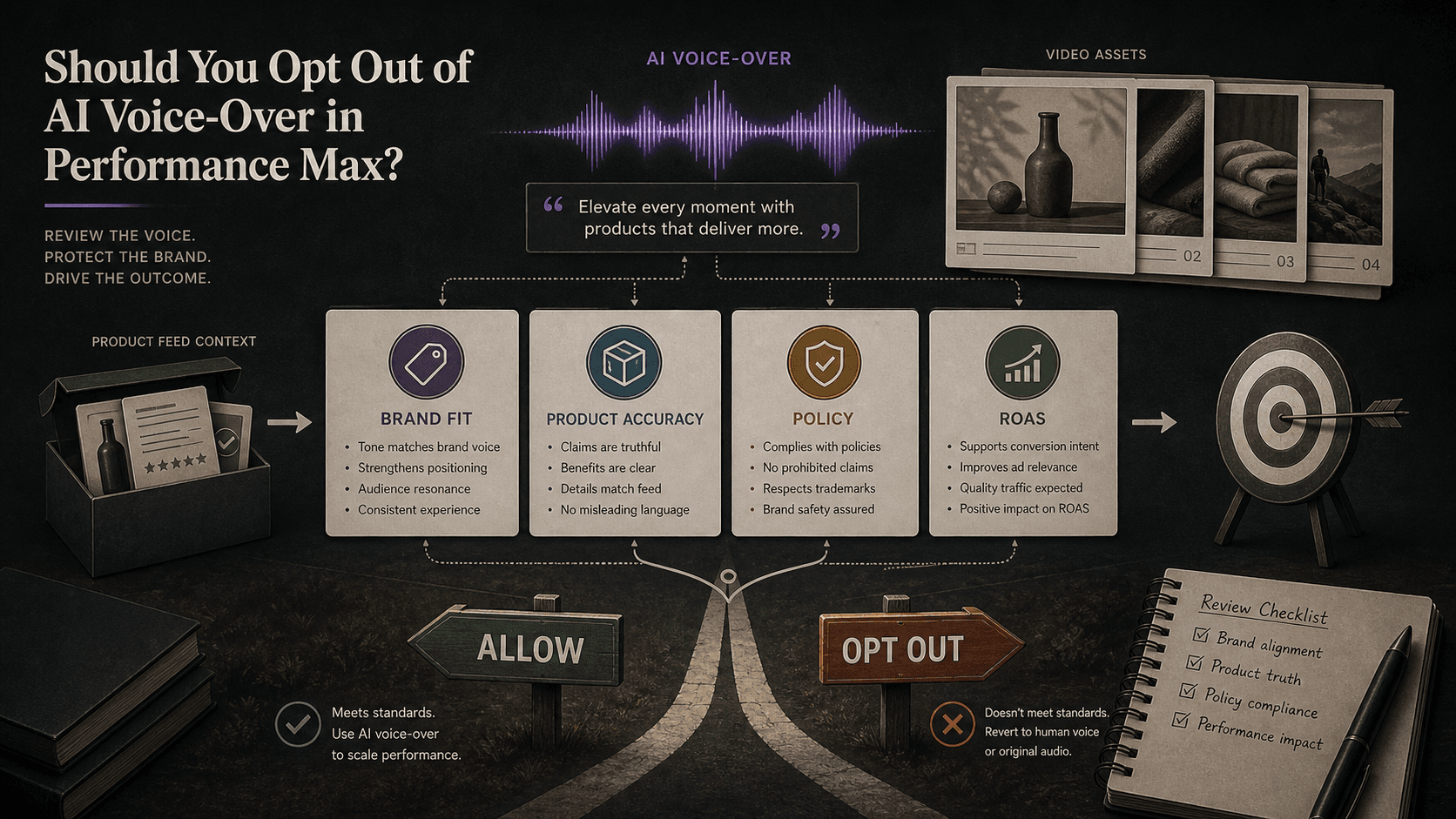
Illustrative concept graphic for Performance Max AI voice-over review, not a product screenshot.
AI voice-over in Performance Max is brand voice by default. This guide helps teams decide when to keep generated narration, limit it, or opt out before it speaks for the offer.
Key takeaway
The brand lead hears a generated voice describe a warranty the legal team never approved, and the paid media lead discovers the clip already running in a Performance Max asset group with sound-on YouTube inventory. Google's Asset Studio Help page describes voice-over as a self-serve tool that can enhance videos for sound-on environments. That convenience is also a default narrator unless the account team chooses otherwise. Opt-out is not anti-AI posturing. It is the governance call about whether Google-generated speech matches product truth, brand tone, and policy boundaries.
The review should cover uploaded video assets, auto-generated video settings, asset groups, Merchant Center or product page context, advertising policies, conversion actions, conversion value, CPA, ROAS, and who will re-check narration after the next feed or offer change. Parallel AI reads the connected Google Ads account, writes the voice-over decision in a doc or spreadsheet, and drafts any campaign note for a person to approve.
Checked against current product, pricing, trust, and official Google materials so the comparison, buying guidance, and fit criteria stay current and defensible.
- Google's Asset Studio Help page supplies voice-over context for sound-on video environments; Performance Max auto-generated video settings were cross-checked against the About Performance Max campaigns page.
- Brand fit, product accuracy, policy risk, asset performance, conversion value, CPA, and ROAS were treated as joint gates before keep, limit, or opt-out recommendations.
- Parallel's role stays limited to connected account review, finished decision notes, and drafted changes held for human approval.
Friday's Performance Max review opens on a vertical video ad the team never filmed. The visuals came from uploaded product shots. The narration did not. Google's Asset Studio Help page describes adding voice-over through a simple self-serve tool to improve performance in sound-on environments like YouTube. That is the reframe: AI voice-over is brand voice by default. Opt-out is the decision about who gets to speak for the offer when the account did not supply its own script.
DEFINITION
Performance Max AI voice-over
Generated narration Google can apply to video assets in Performance Max and related video workflows. Google's Add voice-over to a Video campaign Help page and Asset Studio documentation frame it as an enhancement for sound-on placements. It is not a neutral technical layer. It becomes the spoken version of product claims, pricing language, and brand tone wherever the system pairs it with your visuals.
Google Ads Help: Add voice-over to a Video campaign
Teams that treat voice-over as a minor setting discover the conflict late. Creative approved the silent cut. Brand never heard the words. Policy never reviewed the spoken claim. By the time asset group reporting shows spend, the narrator has already been introducing the product for a week.
The opposite mistake is reflexive opt-out without checking whether the account actually has sound-ready video. Performance Max can also lean on auto-generated video when uploaded coverage is thin, per Google's About Performance Max campaigns page. Voice-over stacked on thin or auto-built footage can compound accuracy risk rather than solve an asset gap.
Product truth is the first gate. Merchant Center feeds, product detail pages, and offer copy should match what the generated voice says about price, shipping, warranties, and availability. A spoken free-trial line that contradicts the landing page is a policy and conversion problem, not a creative preference debate.
Brand tone is the second gate. Pronunciation of product names, regional spellings, and regulated category language matter in finance, health, and youth-oriented categories. Google's advertising policies reference applies to spoken claims the same way it applies to text assets.
Illustrative math: a $19,000 weekly Performance Max budget on tROAS bidding holds while return on ad spend slips from 3.8 to 3.2 over twelve days after a new auto-narrated vertical asset enters rotation. Feed diagnostics are clean. Landing pages match. The spoken offer mentions a bundle discount the site no longer runs. Numbers are illustrative. The mechanism is narration drift masquerading as a bidding issue.
Silence is also a brand choice when the spoken script is wrong.
Once brand voice is the frame, the weekly review stops asking whether AI is allowed and starts asking what the narrator is allowed to say in each market and asset group.
Uploaded video and auto-generated video fail differently. Uploaded assets fail when the team never reviewed the paired narration. Auto-generated paths fail when the system assembles both pictures and words from incomplete inputs. Google's Performance Max documentation notes that auto-generated videos may show a different product than the landing page when Final URL and video content diverge. Spoken copy can widen that gap faster than silent creative because the claim is explicit.
Asset group context matters because Performance Max mixes inventory from one budget. A narration error in a hero asset group does not stay inside YouTube. It rides with Smart Bidding across Search, Shopping, Display, Discover, Gmail, and Maps placements tied to the same conversion goal.
Change history belongs in the same review. A feed rule update, a promotional price change, or a new final URL expansion setting can obsolete narration that was accurate last month. Voice-over governance is recurring, not a one-time toggle.
Voice-over review mapped to campaign surfaces.
| Narration signal | Truth check | Performance read |
|---|---|---|
| Product name or SKU claims | Feed rows, product pages, Merchant Center status | Asset group conversion value and Shopping share |
| Offer, promo, or pricing language | Landing page, policy docs, sale price attributes | CPA and ROAS versus pre-change window |
| Regulated or sensitive claims | Google advertising policies and legal copy | Disapprovals, limited serving, or policy flags |
| Sound-on YouTube or vertical inventory | Uploaded versus auto-generated video source | Video asset spend share and engagement quality |
Review Performance Max video and asset group reporting
An acceptable-sounding voice is not proof the asset earns spend. The performance gate exists to catch narration that is fluent but expensive.
Illustrative CPA
$41
Versus $38 in the prior 14-day window; numbers are illustrative.
Illustrative ROAS
3.2
Versus 3.8 in the prior 14-day window after narration change.
Video spend share
18%
Illustrative rise in video asset spend share in the same window.
Compare asset performance, conversion actions, conversion value, CPA, and ROAS in the same window you judge the narration. A sound-on clip can raise view metrics while lowering qualified conversions if the spoken offer attracts the wrong intent.
Match the lookback to conversion lag for this account. A seven-day slice on a three-day lag business can make a new narrated asset look failed while conversions are still reporting.
Document the quality signal that would reverse the decision. Examples include a ROAS floor breach, a CPA ceiling breach, a policy flag, or a product accuracy ticket from customer support. Without a written reverse trigger, teams argue taste while spend continues.
Where Google's public Help pages do not spell out a specific opt-out control or regional rollout detail, the account team should verify the live campaign and Asset Studio settings rather than assume parity with Video campaign documentation.
Fluent narration plus weak conversion quality is still a no.
With brand voice as the default, the pre-flight review is a short sequence any lead can rerun after feed, offer, or market changes.
Listen to the full narration against product feeds, product pages, and current offer copy for every market where the asset can serve.
Confirm whether the video source is uploaded, edited in Asset Studio, or auto-generated at campaign level, and whether that path changes accuracy risk.
Review asset groups, video asset performance, policy status, conversion actions, conversion value, CPA, and ROAS for the same date range.
Name who can approve keeping, limiting, or opting out of voice-over and what signal triggers a reversal after the next catalog or promo change.
- Match spoken claims to feed rows, pages, and policy copy.
- Separate uploaded video gaps from auto-generated video risk.
- Read asset group and video performance with conversion lag in mind.
- Write reverse triggers before broader budget scale.
A polished voice with a wrong offer still fails brand governance.
Keep available when narration quality, product accuracy, policy context, and conversion quality hold together. Limit when the feature solves a real sound-on gap but needs tighter review on specific offers, languages, or asset groups. Opt out when generated speech risks brand quality, product truth, policy safety, or conversion quality the team cannot correct quickly.
Keep or limit when
- Spoken claims match feeds, pages, policies, and brand tone for in-scope markets.
- Video assets are intentional, not only auto-generated gap fillers without review.
- Asset performance, conversion value, CPA, and ROAS stay inside written floors after a full lag window.
Opt out when
- Narration misstates product, pricing, warranty, or regulated claims.
- Policy flags, disapprovals, or support tickets trace to spoken copy.
- Nobody owns recurring re-review after feed or promo changes.
Voice-over review is a connected-account job Parallel AI handles well. The agent reads Performance Max asset groups, video asset performance, conversion actions, conversion value, CPA, ROAS, and change history from the connected Google Ads account, then writes keep, limit, or opt-out notes in a doc or spreadsheet with product accuracy, policy, and rollback rows. If the call is to pause an asset group, draft a negative keyword note, or flag a feed fix, it waits for a person to approve that change. Creative volume without a narration owner recreates the same Friday argument. See for adjacent asset readiness. On Monday morning, open asset group reporting for any sound-on video with AI narration, log mismatches against live product pages, and send one keep, limit, or opt-out line to brand and paid media before budget scales.
Google documentation
Google's help documentation for voice-over behavior in video workflows.
Official Performance Max reference for campaign scope, inventory, goals, asset groups, and optimization context.
Google's advertising policies reference for claims, restricted content, and policy review.
- Performance Max Video Assets Across Search and ShoppingHelpful when Performance Max video can expand coverage but the team needs product, brand, policy, and performance review before auto-generated defaults scale.
- Asset Studio Veo 3 Video Guide: Review Generated Video Before Campaign UseHelpful when Asset Studio generated video is ready to test but the team still needs brand, policy, tier, and campaign-use governance.
- Google Ads Power Pack Brand Controls: What Still Needs ReviewFor brand and paid media teams pairing native Google Ads controls with approval and rollback discipline.
- Merchant Center Video Hub for Google Ads: Ecommerce Prep GuideFor ecommerce teams with video libraries that outrun hero SKU coverage in live campaigns.