

Asset Readiness
Performance Max Video Assets Across Search and Shopping
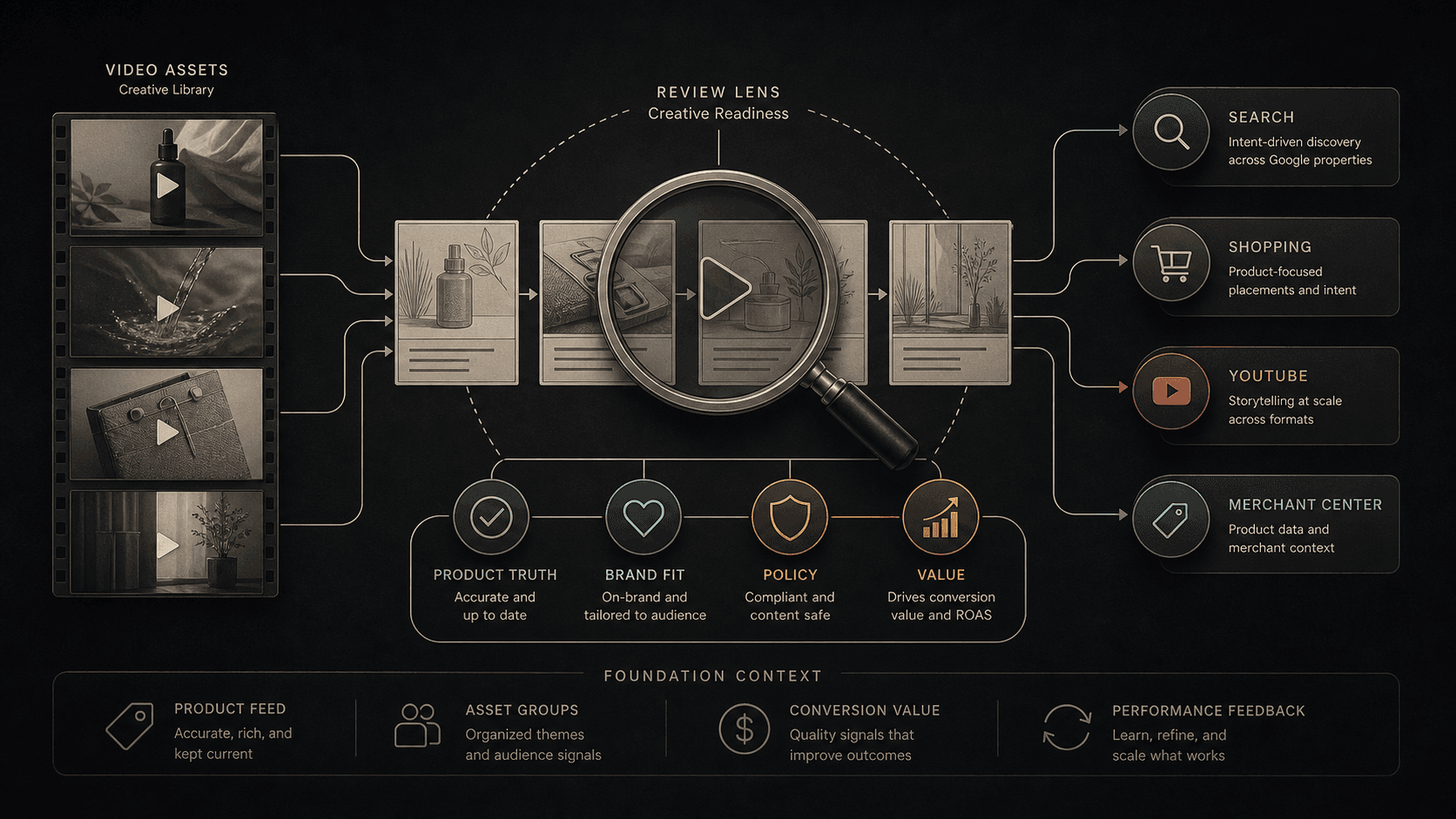
Illustrative concept graphic for Performance Max video asset readiness, not a product screenshot.
When Performance Max lacks uploaded video, auto-generated video can fill the gap. This guide reviews whose creative runs across Search, Shopping, and YouTube before coverage expands.
Key takeaway
The ecommerce lead opens asset reporting and finds vertical video spend rising in a campaign that never uploaded a brand-approved clip. Google's About Performance Max campaigns page describes auto-generated videos as a campaign-level setting that can create additional video assets when accounts lack coverage. That is the reframe: absent uploaded video, the system can supply its own. The governance question is whether your footage, claims, and product filters or Google's defaults should represent the catalog across Search, Shopping, YouTube, and feed-backed placements.
The review should cover product feeds, Merchant Center status, product pages, asset groups, policy risk, brand fit, uploaded versus auto-generated sources, conversion actions, conversion value, CPA, ROAS, and whether video improves product understanding or only increases coverage. Parallel AI reads the connected account, writes the asset readiness review in a doc or spreadsheet, and drafts notes for a person to approve.
Checked against current product behavior, account-review tools, and official Google materials so the explanation matches the real review process and live product boundaries.
- Google's About Performance Max campaigns page supplies auto-generated video context and Final URL mismatch notes; Shopping and Merchant Center sources ground product truth checks.
- Video assets were judged against product accuracy, feed quality, policy risk, brand fit, conversion value, CPA, ROAS, and asset performance before add, revise, monitor, or remove calls.
- Parallel's role stays limited to connected account review, finished readiness notes, and drafted changes held for human approval.
Tuesday's Merchant Center review is clean, Shopping ads are eligible, and Performance Max is scaling on tROAS. Then channel reporting shows YouTube share climbing with asset group lines the creative team does not recognize. Google's About Performance Max campaigns page states that auto-generated videos are a campaign-level setting that helps generate additional video assets. No uploaded video is not the same as no video. It often means the campaign will run someone else's assembly of your URLs, feeds, and defaults.
DEFINITION
Performance Max auto-generated video
Campaign-level video assets Google can create when uploaded coverage is insufficient. Google's documentation lists them beside text customization under campaign settings and links to About video assets for Performance Max campaigns for format and behavior detail. They can appear across YouTube, Display, Discover, Gmail, Maps, and Search inventory tied to the same asset groups.
Google Ads Help: About Performance Max campaigns
Uploaded video is a brand decision. Auto-generated video is a default that becomes a brand decision only after someone reviews it. The ecommerce team that monitors feed disapprovals but ignores video sources is still governing half the storefront story.
Google notes that auto-generated videos may show a different product on the landing page than the one featured in the video when Final URL and video content diverge. For Shopping-heavy campaigns, that mismatch is not cosmetic. It is a product accuracy problem that shows up as click mismatch, weak conversion rate, or support tickets before it shows up as a disapproval.
Product filters in asset groups are the documented mitigation when teams want landing pages to match the product shown. Limiting products to the most relevant landing page is slower than letting the system roam, which is exactly why governance matters before scale.
Voice-over and trim tools in Asset Studio can compound the story when applied to thin source footage. The video path and the spoken path should be reviewed together when sound-on inventory is in play.
Illustrative math: a $31,000 weekly Performance Max budget carries Shopping at fifty-eight percent of spend and YouTube at nineteen percent after auto-generated video enters two asset groups. Return on ad spend holds at 3.4 on paper while product return rate rises and hero SKU conversion value softens. Feed rows are valid. The video featured a bundle the filtered asset group no longer maps to. Numbers are illustrative. The mechanism is coverage without product alignment.
More video placements are not proof the right product is shown.
Once ownership of the video source is clear, the next question is whether the clip helps the campaign job on each inventory type.
Shopping ads depend on Merchant Center product data per Google's Shopping ads Help reference. Video that contradicts feed attributes creates the same trust gap as a price mismatch, except the symptom may surface in asset performance and return rate before diagnostics flag an item.
Search inventory in Performance Max still respects keyword and search theme structure elsewhere in the account. Video that broadens message reach without matching query intent can inflate coverage while diluting qualified clicks.
Asset group reporting is the bridge between channel allocation and creative reality. A rising YouTube share tells you where spend went. Asset group performance tells you whether your video, or the auto-generated substitute, earned the shift.
Video readiness by inventory context.
| Inventory signal | Product truth check | Performance read |
|---|---|---|
| Shopping-heavy weeks | Feed attributes, item IDs, product filters | Conversion value by top SKU and Shopping share |
| Search-assisted demand | Search themes and query fit | Search term insights and CPA by theme |
| YouTube or vertical spend | Uploaded versus auto-generated source | Video asset metrics and placement reports |
| Policy-sensitive categories | Advertising policies and claim accuracy | Limited serving, disapprovals, or low-quality flags |
Review Performance Max video assets and asset groups
Reach is the metric auto-generated video improves first. Product understanding is the metric ecommerce teams need.
Compare video claims with product feeds, Merchant Center status, product pages, and offer copy before approving broader use. A clip that explains a feature incorrectly is worse than a static image that simply shows the SKU.
Review policy risk for regulated claims, comparative language, and promotional offers. Google's advertising policies reference applies regardless of whether the video was filmed in-studio or assembled automatically.
Read conversion value, ROAS, CPA, and asset performance with the same lag window used for other Performance Max changes. Video can lift engagement metrics while lowering qualified conversion value if the wrong product or offer is shown.
Document whether each asset should be added, revised, monitored, or removed. Ambiguous status is how auto-generated defaults stay live past the next catalog refresh.
Coverage without product alignment is still a governance failure.
With yours-or-theirs as the frame, the review sequence stays short and repeatable after feed or offer changes.
Inventory uploaded video, Asset Studio edits, and auto-generated campaign video separately. Each path carries different accuracy risk.
Compare video claims with product feeds, Merchant Center diagnostics, product pages, and Shopping context for in-scope SKUs.
Review asset groups, asset performance, channel share, policy flags, conversion actions, conversion value, CPA, and ROAS in one aligned date range.
Confirm product filters and final URL rules if landing-page continuity is required for the hero offer.
- Separate uploaded, edited, and auto-generated sources.
- Match video claims to feed rows and live pages.
- Read asset and channel reports with conversion lag.
- Write add, revise, monitor, or remove status per asset.
A strong ROAS week does not excuse the wrong SKU on screen.
Add when uploaded or approved video improves product understanding and fits the campaign job with aligned feeds and pages. Revise when the concept works but claims, brand fit, policy context, or landing-page continuity are weak. Monitor when performance data is still maturing inside a limited test. Remove or hold when broader coverage hurts conversion quality, conversion value, or brand standards, or when auto-generated defaults run without owner review.
Add or monitor when
- Video claims match feeds, pages, and policies for in-scope products.
- Uploaded or reviewed sources are intentional, not silent auto-generated defaults.
- Asset performance and conversion value hold after a full lag window.
Remove or hold when
- Auto-generated video shows products or offers the landing page does not support.
- Policy flags, returns, or support tickets trace to video claims.
- Nobody owns post-catalog refresh re-review for video assets.
Video asset readiness is a connected-account review Parallel AI handles well. The agent reads Performance Max asset groups, video asset performance, channel reporting, Shopping performance, conversion actions, conversion value, CPA, ROAS, and change history from the connected Google Ads account, then writes add, revise, monitor, or remove notes in a doc or spreadsheet with product accuracy and source-type rows. If the call is to pause an asset group, tighten product filters, or draft feed fix notes, it waits for a person to approve that change. Feed-clean weeks with mystery video spend recreate the same Tuesday argument. See for adjacent narration governance. On Monday morning, open asset groups with video spend, label each clip as uploaded or auto-generated, log mismatches against live product pages, and send one add, revise, monitor, or remove line before budget scales.
Google documentation
Official Performance Max reference for campaign scope, inventory, goals, asset groups, and optimization context.
Official Shopping ads reference for product data, Merchant Center, and how Shopping ads appear across Google surfaces.
Google's product data reference for feed quality and item requirements.
Google's advertising policies reference for claims, restricted content, and policy review.
- Should You Opt Out of AI Voice-Over in Performance Max?Helpful when Performance Max narration could speed sound-on coverage but still needs brand, product, policy, and performance review.
- Merchant Center Video Hub for Google Ads: Ecommerce Prep GuideFor ecommerce teams with video libraries that outrun hero SKU coverage in live campaigns.
- Asset Studio Veo 3 Video Guide: Review Generated Video Before Campaign UseHelpful when Asset Studio generated video is ready to test but the team still needs brand, policy, tier, and campaign-use governance.
- Google Ads AI Agent for Ecommerce: Search Terms, Shopping, and PMax ReviewFor when Search, Shopping, Merchant Center, and Performance Max need one ecommerce review instead of separate meetings.