

Creative Triage
Merchant Center Content Hub Video Recommendations
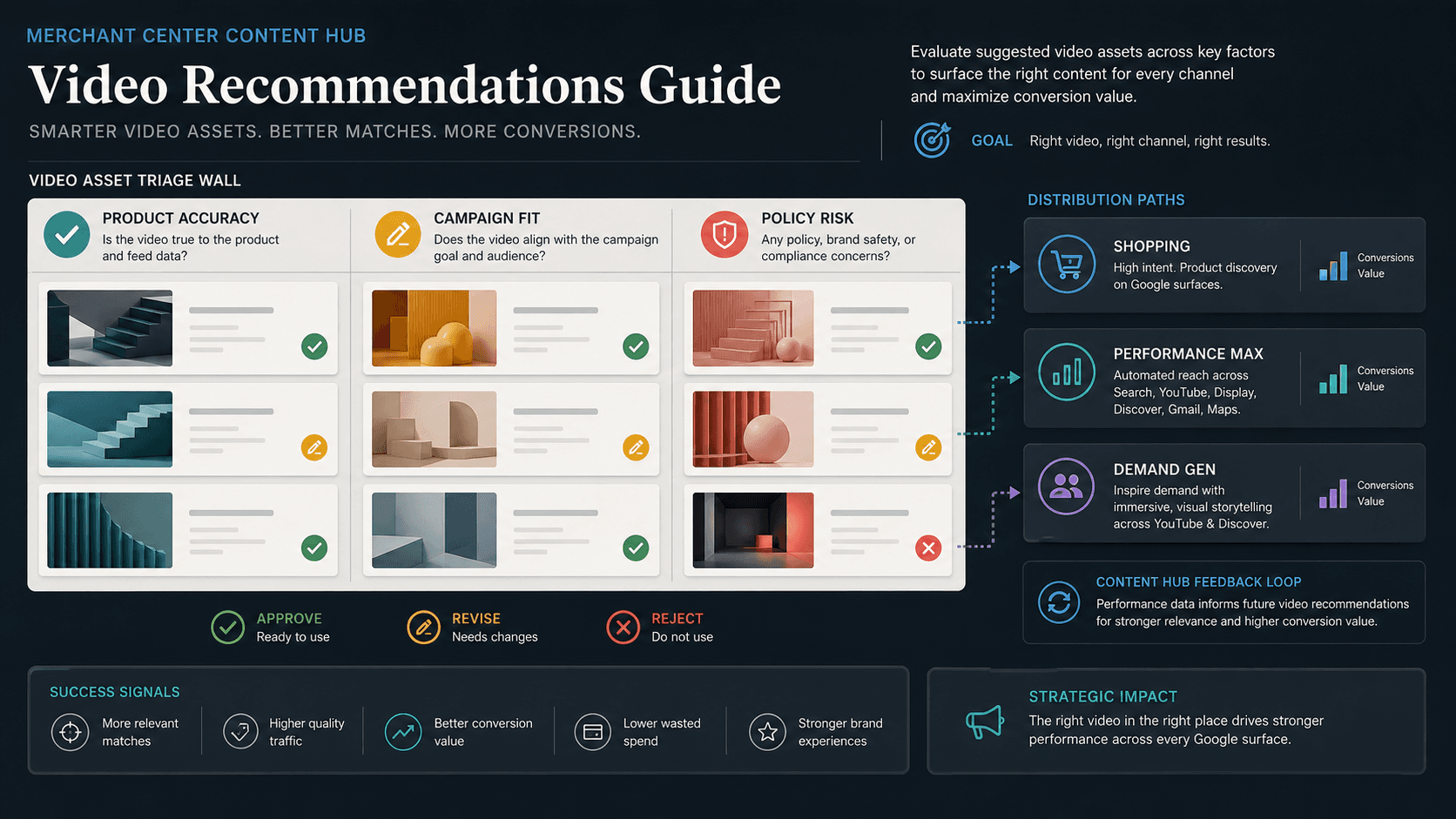
Illustrative concept graphic for Merchant Center Content Hub video triage, not a product screenshot.
Merchant Center video recommendations are a queue, not a mandate. Triage suggested assets by revenue, product truth, and campaign job before PMax or Demand Gen spend attaches.
Key takeaway
Monday morning, Merchant Center shows fourteen new video recommendations and the creative lead wants them all in Performance Max by lunch. Google's Merchant Center announcement describes Content Hub and advanced features as part of modern commerce tooling, but public documentation on recommendation logic is thinner than the product data specification. That is enough to know the queue will refill faster than any weekly brand review. The mistake is treating suggestions as assignments. They are a backlog to triage like search terms: sort by revenue at risk, product accuracy, and campaign job before any asset earns spend.
The reframe is queue discipline, not creative enthusiasm. Accept when product truth, brand fit, policy context, and the active PMax or Demand Gen job align. Revise when the idea is useful but claims, feed match, or format need cleanup. Reject when revenue-weighted evidence says the SKU does not need video this month. Parallel AI reads the connected account, compares asset and product-level performance notes, writes the triage sheet in a doc or spreadsheet, and drafts campaign changes for a person to approve.
Checked against current product behavior, account-review tools, and official Google materials so the explanation matches the real review process and live product boundaries.
- Google's Accelerate with Google Merchant Center article provides announcement-tier Content Hub context; recommendation mechanics should be verified in the live Merchant Center account.
- Performance Max and Demand Gen both consume video assets under Google's campaign Help pages; triage ties suggestions to campaign job before upload.
- Parallel's role stays limited to connected account review, finished triage notes, and drafted changes held for human approval.
Search term reports taught paid media leads a discipline: sort by spend and conversion value before adding negatives or expansions. Merchant Center video recommendations need the same reflex. The Content Hub queue grows whenever Google identifies catalog rows that could use video, but catalog coverage is not the same as campaign priority. A suggested asset for a long-tail SKU can consume review hours while hero SKUs still run static images in Performance Max.
DEFINITION
Content Hub video recommendations
Suggested video assets surfaced in Merchant Center commerce tooling described in Google's Merchant Center announcement. Public documentation emphasizes catalog and merchandising context more than recommendation ranking detail. Teams should treat the list as input to triage, not as approved creative for Google Ads campaigns.
Accelerate with Google: Powering modern commerce with Merchant Center
The tension is coverage versus concentration. Google benefits from richer product video across Shopping and Performance Max inventory. The account benefits when video lands on SKUs that already carry margin, conversion volume, and a clear PMax or Demand Gen job. Without triage, the queue optimizes for completeness while spend optimizes for revenue.
Google's Demand Gen overview describes video-led prospecting across YouTube, Discover, Gmail, and Display. Performance Max bundles video alongside Search, Shopping, and Display placements. The same suggested file can be wrong for one job and right for another. Triage starts by naming the campaign surface, not by rating production quality alone.
Policy-sensitive categories raise the cost of a wrong accept. A recommendation that shows a claim your feed cannot support creates disapproval risk and support load even if early click-through rate looks fine in a 7-day window.
Illustrative sort: ten recommendations arrive on Tuesday. Two map to SKUs that drove 41 percent of conversion value last month. Five map to SKUs with fewer than ten conversions in the prior 28 days. Three show offer language that differs from the primary feed price attribute. Numbers are illustrative. The mechanism is revenue-first triage before any upload.
Where recommendation ranking or UI labels are not documented publicly, verify behavior inside Merchant Center rather than inferring rules from queue order.
Queue length is not a KPI.
Once the queue is a backlog, the weekly creative meeting opens with a ranked list: SKU revenue share, feed match, campaign job, and policy flags. Taste comes after money.
Accept criteria should fit on one line: product page match, landing URL continuity, brand approval, and a named test window with ROAS or CPA floor. Revise criteria name what must change before upload: price overlay, pack shot, duration, or disclaimer. Reject criteria are allowed to be boring. Not every SKU needs video this quarter.
Google's YouTube Performance Four guidance for Demand Gen recommends creative variety and gradual asset changes. Triage respects that cadence by feeding the queue into ad groups slowly rather than dumping fourteen files on Monday.
Post-launch read belongs in the same sheet. Asset-level reporting in Performance Max shows which video combinations earn spend. A accepted recommendation that never clears minimum traffic should not block the next hero SKU in line.
Triage columns before accept or reject.
| Signal | Where to read it | Triage action |
|---|---|---|
| Revenue weight | Product-level conversion value in Google Ads | Prioritize hero SKUs before long-tail coverage |
| Feed truth | Primary feed price, availability, title | Revise or reject when video claims diverge |
| Campaign job | PMax asset groups or Demand Gen ad groups | Accept only when surface match is explicit |
| Policy risk | Category rules and prior disapprovals | Reject or legal review when claims are sensitive |
Review asset performance after video upload
With the ranked list built, each recommendation gets the same short gate before upload or test.
Match video claims to primary feed attributes and the live product detail page for price, availability, bundle contents, and regulated language.
Name the campaign job: Performance Max hero asset group, Demand Gen prospecting, or remarketing. Reject cross-purpose uploads that satisfy the queue but confuse bidding.
Check prior disapprovals and category policy notes for the SKU family. A recommendation is not exempt from rules the feed already enforces.
Set a 14-day test window with asset-level success criteria and a reject path if CPA, ROAS, or conversion value loosens against the pre-video baseline.
- Rank open recommendations by trailing conversion value share.
- Compare claims to feed rows and product pages before accept.
- Upload to one named ad group before account-wide rollout.
- Review asset-level spend and conversions after 14 days.
Creative taste without revenue sort is how queues become debt.
Accept when product truth, brand fit, policy context, and campaign job align on a revenue-weighted SKU. Revise when the concept is sound but feed match or format needs work. Reject when the SKU lacks volume, violates policy subtext, or does not have a named campaign home this month.
Accept when
- SKU ranks in the account's revenue-weighted tier for the quarter.
- Feed attributes, product page, and video claims match without legal flags.
- Named PMax or Demand Gen ad group and 14-day test criteria exist in writing.
Reject when
- Video offer language diverges from primary feed price or availability.
- Nobody named which campaign surface will host the asset.
- Category policy history for the SKU family is unresolved.
Content Hub triage is a connected-account workflow Parallel AI supports well. The agent pulls product-level performance, asset reports, and campaign structure, ranks open recommendations against conversion value share, and writes accept, revise, or reject rows in a doc or spreadsheet the creative and paid media leads share. If the decision is to add, pause, or remove an asset in Performance Max or Demand Gen, it drafts that change and waits for a person to approve it. Accept-all Mondays recreate the same CPA argument by Thursday. See for placement context. On Monday morning, export the open recommendation list, sort by trailing conversion value, and send one accept, revise, or reject note per hero SKU before anyone uploads to a live ad group.
Google documentation
Google's commerce and Merchant Center explainer for merchandising-heavy teams.
Official Performance Max reference for campaign scope, inventory, goals, asset groups, and optimization context.
Google's Demand Gen reference for campaign scope and creative context.
- Merchant Center Video Hub for Google Ads: Ecommerce Prep GuideFor ecommerce teams with video libraries that outrun hero SKU coverage in live campaigns.
- Asset Studio Veo 3 Video Guide: Review Generated Video Before Campaign UseHelpful when Asset Studio generated video is ready to test but the team still needs brand, policy, tier, and campaign-use governance.
- Performance Max Video Assets Across Search and ShoppingHelpful when Performance Max video can expand coverage but the team needs product, brand, policy, and performance review before auto-generated defaults scale.
- Merchant Center Brand Profile Governance GuideFor ecommerce teams where rebrand or seasonal updates need Merchant Center ownership before Shopping and Performance Max scale.