

AI Max Migration
DSA to AI Max Migration Checklist for Search Campaigns
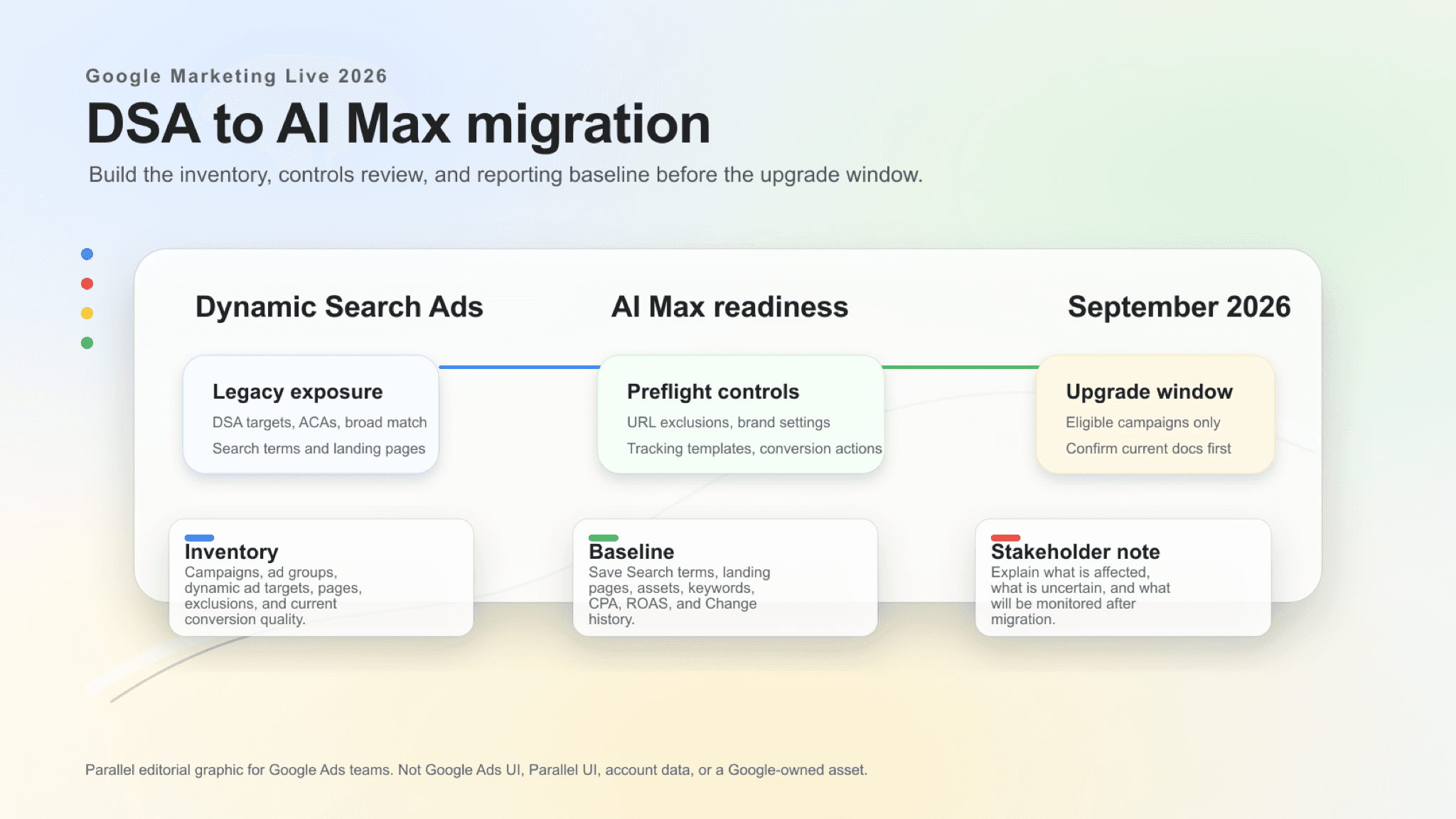
This guide is for the September 2026 Dynamic Search Ads upgrade window, where migration, reporting, and stakeholder-communication work need a clear owner.
The September 2026 DSA to AI Max upgrade path needs a campaign inventory, URL and tracking cleanup, and a reporting baseline before eligible Search campaigns move.
Key takeaway
Google has announced a September 2026 upgrade path from Dynamic Search Ads and related legacy Search features into AI Max for eligible campaigns.
Before that window, Google Ads teams should inventory Dynamic Search Ads campaigns and targets, automatically created assets, campaign-level broad match settings, URL exclusions, tracking templates, landing pages, conversion actions, brand settings, and current reporting baselines.
A strong migration plan names the exposed campaigns, the controls that need cleanup, the reporting views that will be watched after the upgrade, and the client or stakeholder language the team will use before performance changes are interpreted.
The DSA-to-AI Max migration should be treated as a Search campaign control review: Dynamic Search Ads coverage, automatically created assets, broad match exposure, URL rules, tracking, and conversion quality all need a baseline before the upgrade window.
- Dynamic Search Ads coverage, landing-page targets, URL exclusions, brand settings, tracking templates, and conversion actions were inventoried before the upgrade window.
- Eligible campaigns and visible account-level options were confirmed before any campaign structure change was recommended.
- Pre- and post-migration review plans were set for Search terms, landing pages, assets, keywords, CPA, ROAS, and Change history.
Google's DSA upgrade announcement makes Dynamic Search Ads a 2026 Search controls issue, not a legacy campaign-type cleanup.
Google says campaigns using Dynamic Search Ads, automatically created assets, and campaign-level broad match settings will automatically upgrade to AI Max starting in September 2026 for eligible campaigns. That wording matters. The date, the eligible-campaign qualifier, and the affected Search surfaces should all stay intact when teams brief clients or leadership.
The practical response is not panic and not blind adoption. It is a controlled inventory of the Search campaigns that could be affected, the landing pages and URL rules those campaigns rely on, the tracking templates they use, and the reporting views the team will need before and after the upgrade.
September is a deadline only if the account knows what is in scope.
Google documentation·Google Ads and Commerce Blog
Dynamic Search Ads upgrade path
Google's Ads and Commerce post is the source for the September 2026 upgrade language around eligible Dynamic Search Ads, automatically created assets, and campaign-level broad match settings.
Open Google sourceThe first migration question is exposure: which campaigns use the legacy features Google named, and how important are they to current performance?
| Surface | What to collect | Why it matters |
|---|---|---|
| Dynamic Search Ads | Campaigns, ad groups, dynamic ad targets, landing-page coverage, exclusions, Search terms, CPA, ROAS, and conversion quality. | DSA behavior often depends on site structure and landing-page quality, so migration planning needs page-level context. |
| Automatically created assets | Campaigns where Google can generate assets, existing asset performance, policy-sensitive language, and brand-review concerns. | Generated asset behavior can change how the account represents the advertiser, not only how it reaches traffic. |
| Campaign-level broad match | Campaigns with broad matching exposure, query themes, negative keywords, conversion actions, Target CPA or Target ROAS settings, and budget constraints. | Broader matching can change the mix of Search terms and landing-page demand that AI Max will need to govern. |
| Shared controls | Brand settings, URL exclusions, Final URL expansion settings, tracking templates, and account or campaign naming conventions. | Controls and tracking determine whether the team can explain, measure, and limit the migration after it happens. |
AI Max for Search campaigns can affect matching, creative, landing-page selection, controls, and reporting. Before the migration window, teams should review the same inputs they would review before any serious AI Max test: search term quality, page eligibility, URL controls, brand settings, tracking templates, conversion actions, and the learning period they expect after changes.
This is also the point to decide what should be cleaned up before the upgrade path reaches the account. Weak landing pages, outdated tracking templates, unclear brand rules, and noisy conversion actions are easier to fix before a migration than after performance changes are already under review.
Clean controls before September beat post-migration guesswork.
Review AI Max campaign settings
01
Check URL eligibility and exclusions
Review which landing pages DSA currently reaches, which pages AI Max could use, and which URL exclusions or page rules need to be updated before migration.
02
Review tracking templates
Confirm tracking templates, final URL suffixes, ValueTrack parameters, redirects, and analytics naming before landing-page behavior changes.
03
Clean up conversion signals
Separate primary conversions, secondary conversions, offline conversions, qualified leads, converted leads, CPA, and ROAS targets before judging post-migration performance.
04
Set the brand and text review rule
Document how text customization, automatically created assets, brand settings, policy-sensitive language, and approvals will be reviewed.
Google documentation·Google Ads Help
AI Max for Search campaigns
Google Ads Help is the baseline for AI Max controls, reporting, tracking-template cautions, and account-specific setup checks.
Open Help docA migration is only manageable if the team knows how Search terms, landing pages, assets, conversion actions, CPA, ROAS, and budgets behaved before AI Max changed the system.
Use the current account to capture a pre-migration baseline for Search terms, landing pages, ads and assets, keywords, conversion actions, CPA, ROAS, impression volume, and budget behavior. The goal is not to create a perfect forecast. It is to make sure the team can distinguish a real post-migration shift from ordinary week-to-week noise.
Save a Search terms baseline for the Dynamic Search Ads campaigns and broad match campaigns in scope. Save a landing-page baseline so Final URL expansion and URL-control questions can be reviewed with page-level detail. Save conversion-action and lead-quality baselines before explaining CPA, ROAS, qualified leads, or converted leads. Mark settings, controls, targets, budgets, and conversion-action changes in Change history and campaign notes so post-migration shifts have a dated reference.
After migration, compare AI Max reporting against that baseline. Look for changes in query themes, landing pages, asset mix, conversion quality, spend concentration, and any learning-period behavior Google documents for the account's AI Max setup.
The baseline exists so the team can name what moved, not just that something moved.
Google documentation·Google Ads Help
AI Max reporting
Google Ads Help documents the reporting views teams should baseline before and after an AI Max migration, including Search terms and landing pages.
Open reporting docThe stakeholder note should be simple: Google has announced a September 2026 upgrade path for eligible campaigns using Dynamic Search Ads and related legacy Search features; the team is inventorying exposure; and any account-specific action depends on eligibility, documented controls, and current Google Ads guidance.
The note should also say what will be monitored after migration. Search term quality, landing-page distribution, text and asset behavior, conversion quality, CPA, ROAS, and budget movement are clearer than vague promises about AI performance.
What is affected
Name the campaigns, ad groups, DSA targets, automatically created asset exposure, campaign-level broad match settings, and business units in scope.
What is uncertain
Preserve Google's eligibility language and avoid promising exact account behavior, Editor support, bulk workflow parity, or API parity unless current Google documentation confirms it.
What will be monitored
List the reporting views and business metrics the team will compare before and after the upgrade.
Once an eligible campaign moves into AI Max, the first review should answer three account questions: what changed, what stayed stable, and what needs a hold rule?
| Review area | Question to answer |
|---|---|
| Search terms | Did new query themes appear, and are they aligned with the advertiser's products, services, locations, exclusions, and conversion goals? |
| Landing pages | Did traffic shift toward different pages, and do those pages support the offer, tracking, disclosures, and conversion path? |
| Assets and text | Do generated or customized assets stay accurate, policy-safe, and on brand while still supporting useful Search coverage? |
| Conversion quality | Did CPA, ROAS, qualified leads, converted leads, revenue quality, or offline conversion feedback move in a way the team can explain? |
| Controls | Are URL exclusions, brand settings, tracking templates, budgets, bidding targets, and negative keyword rules still doing the job the team expects? |
Post-migration review ends when each row has a keep, adjust, or hold call.
Dynamic Search Ads to AI Max migration planning touches campaign settings, landing pages, Search terms, conversion quality, reporting, client communication, and follow-up review. That work needs one finished record tied to the connected account.
Parallel AI inventories affected campaigns from the connected Google Ads account, writes the migration readiness review and reporting baseline in a doc or spreadsheet, and drafts any URL, tracking, or campaign change for a person to approve before it ships.
The plan should be readable before September, not reconstructed from screenshots after.
The safest migration plan keeps Google's caveats visible until the account and current docs confirm more detail.
- Do not assume every DSA campaign in every account will behave the same way after migration.
- Do not remove September 2026 or eligible-campaign language from client-facing notes.
- Do not claim Google Ads Editor support, bulk workflow parity, or API parity unless current Google documentation confirms it.
- Do not judge the migration from aggregate CPA or ROAS alone; review Search terms, landing pages, assets, conversion actions, and lead or revenue quality.
- Do not expand AI Max settings before tracking templates, URL controls, brand settings, and conversion actions are clean enough to interpret results.
Google documentation
Google Ads and Commerce post describing the September 2026 automatic upgrade path for eligible Dynamic Search Ads, automatically created assets, and campaign-level broad match settings.
Google Ads and Commerce post on AI Max updates, including expansion context and new ways to steer AI Max performance.
Google Ads Help reference for AI Max features, controls, reporting overview, and tracking-template cautions.
Google Ads Help reference for AI Max search terms, landing pages, assets, keywords, and learning-period guidance.
Google Ads Help reference for currently documented AI Max setup and opt-in paths.
Google Ads Help FAQ for AI Max availability, DSA and Performance Max boundaries, and account interaction caveats.
Google Ads API release notes for version-specific support, resources, fields, and unsupported API assumptions.
- Blog homeBrowse every published Google Ads guide from one editorial index.
- Google Ads AI agent: complete guideThe pillar guide covers the category definition, the adoption model, and where the agent fits real Google Ads work.
- ResourcesMove between the definition page, pricing, product walkthrough, and trust pages.
- About Parallel AISee the company mission, editorial standards, and operating principles behind the product.
- SecurityReview the public data-handling, account-connectivity, and approval-control framing used throughout the published guides.
- Author profileSee the background, specialties, and editorial responsibilities behind the published guides.
- Editorial reviewReview how pricing, trust, and capability claims are checked before public content ships.
- Google Marketing Live 2026: What Google Ads Teams Should Review FirstThe first GML response is a prioritized account review across campaign inputs, not a feature rollout checklist.
- Google Search Ads After GML 2026: AI Mode, Offers, and Lead QualitySearch terms, conversion actions, and documented reporting need a baseline before AI Mode or AI Max changes move budget.
- AI Max Expansion After GML 2026: What to Audit Before You Adopt ItHelpful when Google Ads teams need to audit AI Max readiness without losing account-level review and approval.
- AI Max Testing Playbook for Google Ads Search CampaignsFor paid search leads running a controlled AI Max experiment on a healthy Search campaign.
- AI Max Text Guidelines: Keep Google Ads Copy On-BrandFor paid search and brand teams reviewing AI Max text customization before scale.
- AI Mode and AI Max Readiness Checklist for Google AdsHelpful when Search automation is on the roadmap but the account still needs measurement, copy, landing-page, and budget readiness checks.
- Google Ads Negative Keyword Builder With AI: Search Terms, Waste, and Review NotesFor building negative keyword lists from Google Ads search terms with AI and human review.
- Data Manager Conversion Diagnostics: Fix Drift Before Bid ChangesFor analytics and paid media teams where conversion drift needs plumbing review before Smart Bidding moves.