

Negative Keyword Workflow
Google Ads Negative Keyword Builder With AI
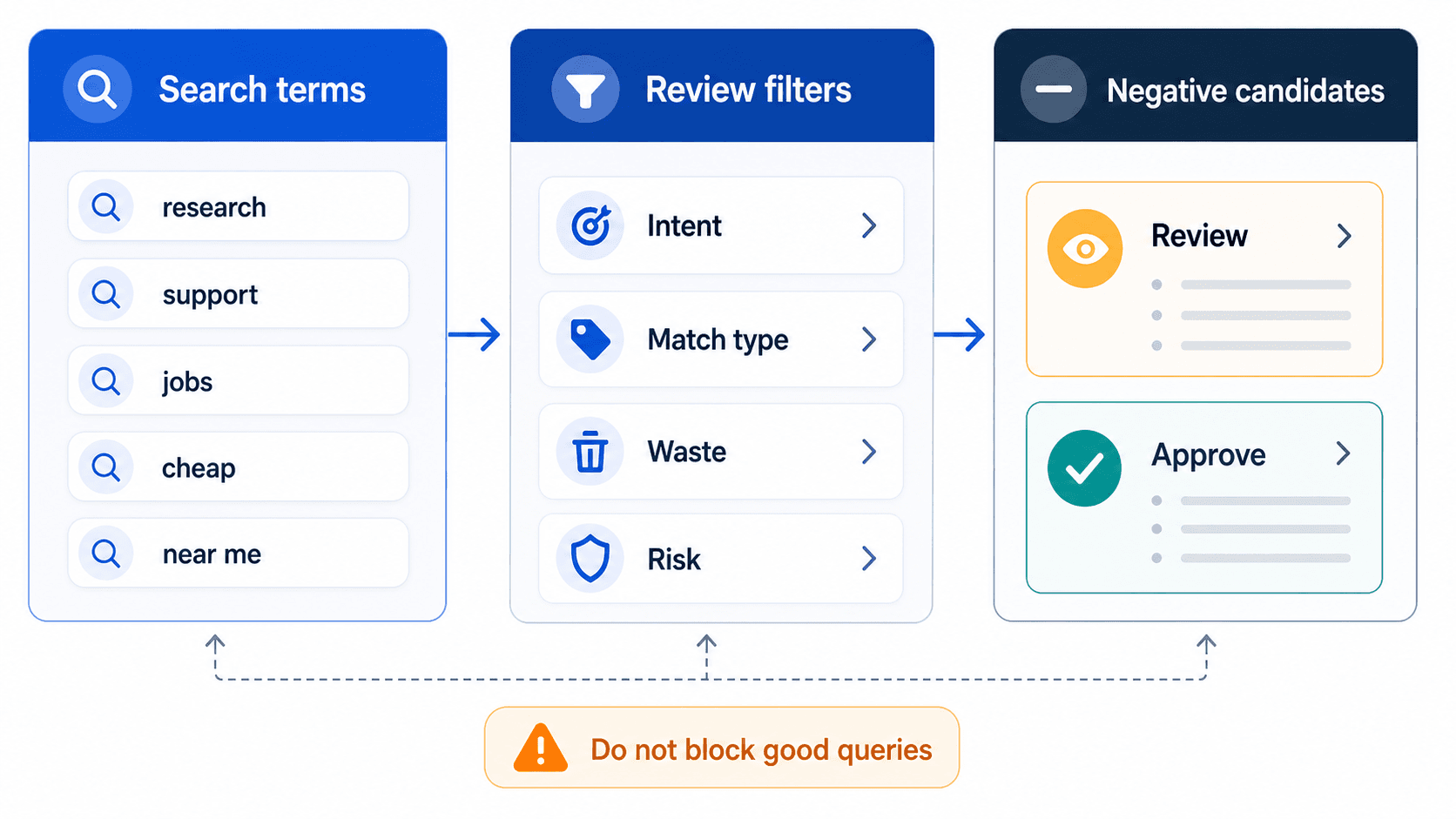
Good negative keyword work protects budget without overblocking valuable traffic.
A negative keyword list is a record of decisions. Build it from search terms so the next person can see why each term is there.
Key takeaway
Six months later, a new paid search lead inherits a 400-line negative list and blocks a high-value query variant because the list never said why the original term was excluded. The account loses conversions for two weeks before anyone traces the damage back to a rushed upload. A negative list is a record of decisions, not a block list. Build it so the next person can see why each term is there.
A good AI negative keyword builder should start from the Google Ads Search terms report, group waste patterns, separate campaign-level and account-level exclusions, and produce review notes that explain what the negatives are meant to block.
Parallel fits when negative keyword work is part of a broader account review. The same workspace can help inspect query quality, wasted spend, campaign context, and reporting notes before a human approves the final exclusion list. Drafted negatives stay in review until an account owner signs off.
Checked against current product behavior, account-review tools, and official Google materials so the explanation matches the real review process and live product boundaries.
- Google's negative keyword documentation is the source for controls and application scope.
- Grouped search term review, not generic keyword generation, is the focus.
- The human-review step stays visible because careless negatives can block valuable traffic.
The builder job is not longest list. It is the clearest record of what was blocked, where, and on what evidence.
DEFINITION
Negative keyword decision record
A grouped exclusion entry that ties each negative to search-term evidence, campaign or account scope, spend and conversion context, and the business rule behind the block. Google's negative keyword Help page describes match types and application levels.
Google Ads Help: About negative keywords
Pull the Search terms report with query text, campaign, ad group, match type, spend, clicks, conversions, and conversion value so each term is reviewed in context.
Cluster repeated patterns such as jobs, support, free, DIY, competitors, irrelevant locations, or mismatched product intent. AI is useful when it groups those clusters and preserves the evidence instead of emitting isolated terms.
Separate campaign-level negatives from patterns that deserve account-level treatment. Google's account-level negative keyword documentation treats shared exclusions as a higher-impact control.
Write the review note: what the negatives block, where they should be applied, and which traffic risks need a final check before upload.
Export the decision record beside the upload file: cluster name, example queries, spend at risk, conversion note, scope, owner, and review date.
Phrase match and exact match negatives carry different risk profiles. The record should say which match type was chosen and why.
A list without reasons is a liability handed to the next lead.
With decisions framed as records, the pre-upload checklist is how you prevent expensive overblocking.
Negative keywords can block valuable traffic. Teams should review scope, intent, match type, and conversion context before applying the list.
Higher-risk shared negatives deserve a second reviewer because account-level controls propagate farther than campaign-level edits.
Match type choice should appear in the decision record too. A broad negative that made sense as a phrase match can become dangerous when someone later copies it into a broader match type without rereading the evidence.
Smart Bidding campaigns still need human judgment on negatives because query mix feeds the learner. A block list without context can starve the campaign of the queries that were actually converting.
Ready to upload
- Each negative comes from actual search-term data with spend and conversion context attached.
- Campaign-level and account-level scope is explicit.
- The review note explains intent, not only the blocked text.
Send back for review
- A broad negative could remove a valuable query variant.
- Shared account-level negatives lack a second reviewer on high-risk patterns.
- The list arrived without the business rule behind the cluster.
The best negative list reads like a case file, not a dump.
Negative builders fail when they become emergency dump tools. The cadence should match how fast queries actually drift in your account.
Weekly rereads are enough for most high-spend Search and AI Max campaigns. Monthly passes may suffice for low-volume ad groups if spend is capped and query drift is slow.
Pair every build session with the wasted-spend review surfaces: search terms first, then placements and devices if the account still leaks after query cleanup.
Archive the decision record beside the upload file. Future leads should not need a forensic project to understand a list someone else published.
Illustrative cadence: 45 minutes every Tuesday on the top three campaigns by spend, one shared sheet for clusters, one approver for account-level rows. Adjust times to your account. Keep the record habit.
Pair the builder output with the client or internal reporting note when negatives affect visible performance. Silence creates surprise when query mix shifts.
Cadence turns a builder into a maintenance discipline.
If negatives are decision records, they should not live in a detached generator tab.
Parallel supports negative keyword work when it is part of a broader account review. The team can ask for wasted-spend analysis, grouped exclusions, a sheet, and a summary that explains what changed.
The agent reads the connected Google Ads account, finishes grouped negatives and review notes in docs, sheets, or reports, and keeps drafted account changes waiting for human approval.
That matters because negative keywords are easy to overapply. The output should make the review faster without hiding the traffic risk from the person responsible for the account.
See how to find wasted spend in Google Ads with AI. On Monday morning, open your latest negative upload, pick five exclusions at random, and confirm each one still has search-term evidence, scope, and a written reason in the account notes or shared sheet.
Rewrite any entry that fails before the next list ships. One bad row is enough to justify a full reread.
Decision records protect the account from future you.
Google documentation
Google's current guidance on how negative keywords should be used when cleaning search-term waste.
Google's official guide for shared negative-keyword controls at the account level.
Google's core reference for bidding automation, target-setting, and when performance diagnosis still needs human review.
Google's current overview of native AI Mode and AI Max features and where external workflow tools sit around them.
About Parallel
Current security, data-handling, and connectivity framing.
Company mission and editorial review context behind the published guides.
- Blog homeBrowse every published Google Ads guide from one editorial index.
- Google Ads AI agent: complete guideThe pillar guide covers the category definition, the adoption model, and where the agent fits real Google Ads work.
- ResourcesMove between the definition page, pricing, product walkthrough, and trust pages.
- About Parallel AISee the company mission, editorial standards, and operating principles behind the product.
- SecurityReview the public data-handling, account-connectivity, and approval-control framing used throughout the published guides.
- What Is Parallel AI? A Clear Definition for Google Ads TeamsOfficial definition page for Parallel AI, with brand clarity and Google Ads fit.
- Pricing for Google Ads TeamsPricing, account-limit, and trial-policy page for Parallel AI.
- How Parallel AI Works for Google Ads TeamsProduct walkthrough for how Parallel AI fits into Google Ads reviews and approvals.
- Google Ads AI Agent for Agencies: Reviews, Reports, and ControlsFor agencies that need a repeatable multi-account review and reporting model that cuts rework without loosening approvals.
- AI Agent That Connects to Google Ads for Campaign Audits: What It Should CheckFor teams that need a Google Ads audit agent for Search, PMax, Shopping, reports, and human review.
- How to Find Wasted Spend in Google Ads With AIFor accounts that need lower wasted spend without overblocking useful traffic.
- What Are AI Agents for Google Ads? Start With the Main GuideShort path for buyers looking for the full Google Ads AI agent category guide.
- Best AI Agent for Google Ads Audits and Reporting: What PPC Teams Should CompareFor teams comparing Google Ads AI agents for audits, reports, and reviewed next steps.