

Demand Gen And YouTube
Demand Gen and YouTube After GML 2026: Creative, Commerce, Measurement
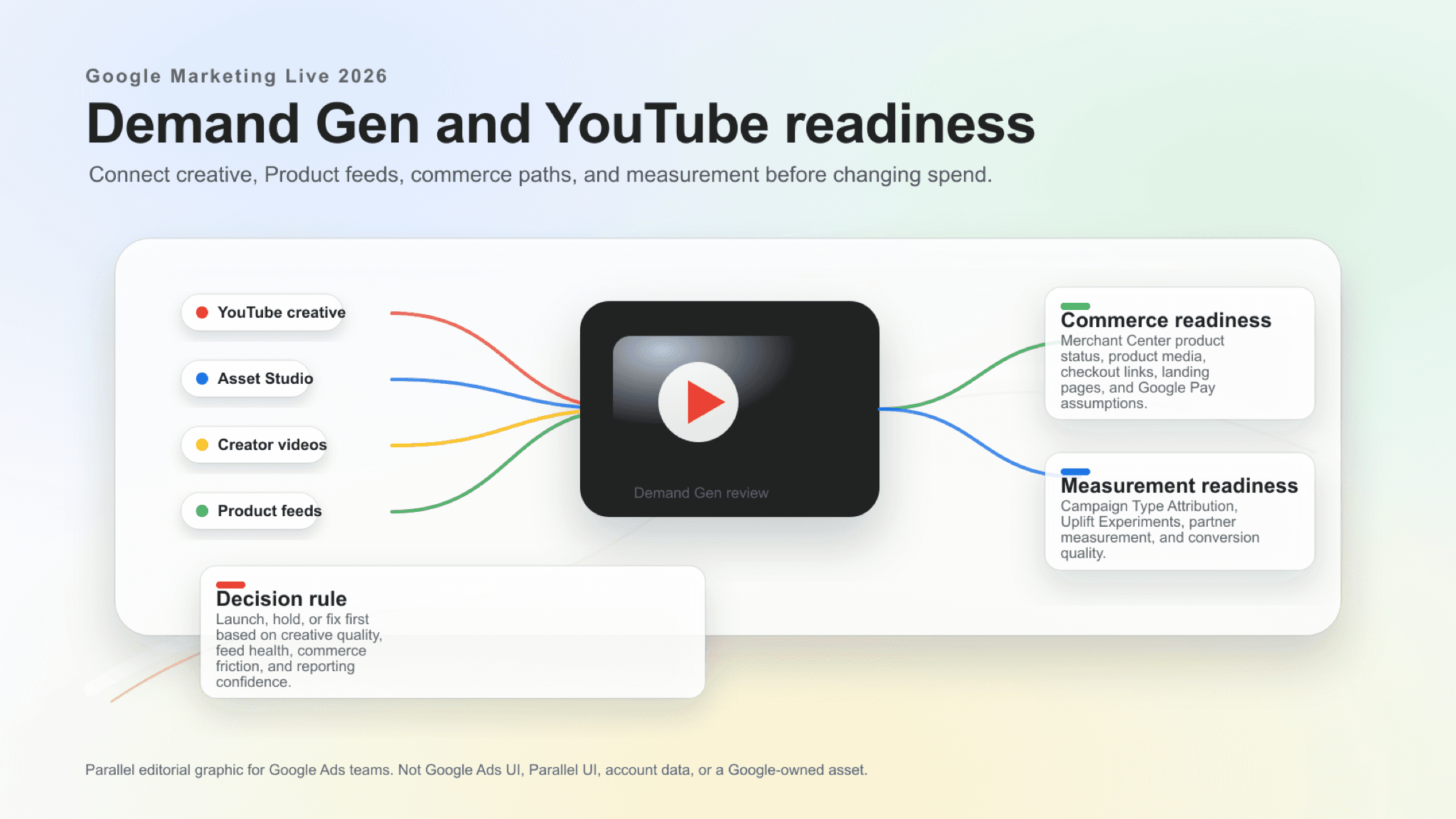
Demand Gen expansion depends on creative quality, Product feed health, commerce paths, measurement, and conversion quality.
Demand Gen after GML 2026 depends on creative review rules, Product feed health, checkout paths, and conversion quality before spend expands on YouTube.
Key takeaway
Demand Gen and YouTube after Google Marketing Live 2026 should be reviewed as a creative, commerce, Product feeds, and measurement readiness question.
Google announced new Demand Gen capabilities around Asset Studio creative, creator partnership videos, Merchant Center product videos, Google Maps inventory, checkout links, Product feeds, Campaign Type Attribution, Uplift Experiments, and partner measurement.
Before changing campaigns, teams should review creative inputs, Product feeds, Merchant Center status, checkout paths, local or Maps assumptions, Performance Max overlap, conversion actions, reporting boundaries, and whether lead or purchase quality is strong enough to interpret results.
The GML 2026 Demand Gen story is not only more YouTube reach. The account has to prove that Video assets, Product feeds, Merchant Center status, checkout paths, and conversion actions can support the reach.
- Video assets, creator partnership assets, Product feeds, Merchant Center product data, checkout links, Maps assumptions, and Performance Max overlap were reviewed before any spend change was recommended.
- Reporting views and experiment options visible in the account were confirmed before new Demand Gen signals were treated as decision-ready.
- Creative, feed, commerce, and conversion-quality work was separated into must-fix-before-launch items and items that could wait until after a guarded test.
Google's Demand Gen announcement points to a broader performance role for YouTube: more creative inputs, more commerce surfaces, more feed usage, and more measurement questions.
Google described Demand Gen updates across AI-assisted creative, creator partnership videos, Merchant Center product videos, Google Maps inventory, checkout links, Product feeds, Campaign Type Attribution, Uplift Experiments, and partner measurement.
That does not make every feature a setup task for every advertiser. The practical account review is creative, feed, commerce, and measurement readiness: which assets are approved, which products are eligible, which checkout paths work, and which reporting views can explain incremental value without confusing Demand Gen with other campaign types.
Reach without those inputs is just louder reporting.
Google documentation·The Keyword
Demand Gen updates on YouTube
Google's YouTube post covers Demand Gen updates across creative, creator partnership videos, Product feeds, Google Maps inventory, checkout links, Campaign Type Attribution, Uplift Experiments, and partner measurement.
Open YouTube postGoogle video·Accelerate with Google
Drive ROI with Google AI-powered Video campaigns
Google's official Google Marketing Live follow-up session gives Demand Gen teams current context on AI-powered reach, views, and full-funnel video planning.
Video assets, Product feeds, checkout paths, Performance Max overlap, and conversion actions decide whether Demand Gen expansion creates useful demand or noisy reporting.
| Area | What to review | Why it matters |
|---|---|---|
| Creative inputs | YouTube assets, Asset Studio briefs, brand guidelines, creator partnership videos, product videos, approvals, and edit ownership. | Demand Gen performance depends on creative quality, and new AI-assisted paths still need brand, policy, and campaign-fit review. |
| Product feeds | Merchant Center product status, disapprovals, eligible products, images, videos, titles, prices, availability, and feed ownership. | Product-feed expansion is only useful if the products Google can show are accurate, approved, and commercially worth promoting. |
| Commerce paths | Checkout links, market availability, landing-page match, mobile checkout, local or Maps assumptions, and post-click measurement. | New discovery surfaces can create demand, but weak checkout or local readiness can turn that demand into noisy conversion data. |
| Performance Max overlap | Performance Max source settings, product overlap, audience assumptions, incremental reach, and reporting expectations. | AI-assisted Demand Gen setup and Uplift Experiments should be interpreted with clear channel and campaign boundaries. |
| Measurement | Campaign Type Attribution, platform-comparable columns, Uplift Experiments readiness, view-through conversions, and conversion actions. | Teams need to know what is documented, what is comparable, and what should remain a caveated test interpretation. |
Open Demand Gen campaign settings
The launch call only holds when creative, feed, commerce, and measurement rows all have a named owner.
Google says Asset Studio can use a marketing brief, brand guidelines, website, and goals to generate assets across creative themes and asset types, with multimodal video creation and 1-Click A/B Testing included in the GML updates.
For Demand Gen teams, the account question is whether creative production has a review system. AI-created or AI-assisted assets should still be checked for brand fit, policy risk, product accuracy, legal claims, localization, aspect ratios, and whether the asset matches the campaign objective.
Asset Studio only saves time when the review rule exists before the first export.
- Create a shared creative review rule for Asset Studio outputs before scaling new Demand Gen assets.
- Review creator partnership videos for usage rights, audience fit, landing-page continuity, and measurement expectations.
- Keep 1-Click A/B Testing as a planning topic until Google publishes deeper eligibility, sample-size, and reporting documentation.
Google documentation·Google Ads & Commerce Blog
Asset Studio updates
Google's Asset Studio post describes multimodal video creation, creative generation from briefs and brand guidelines, 1-Click A/B Testing, and a global English rollout this summer.
Open Asset Studio postGoogle's YouTube announcement says Product feeds are expanding to more surfaces and verticals, and that retailers will be able to upload videos to Google Merchant Center for dynamic distribution across Demand Gen campaigns based on real-time user interest.
That makes feed quality a performance issue, not just a Merchant Center maintenance task. Product titles, product media, price and availability, disapprovals, checkout links, landing-page consistency, and local or Maps readiness should be reviewed before a team treats new Demand Gen reach as incremental sales opportunity.
Feed errors become campaign errors the moment Product feeds drive Demand Gen.
01
Review product eligibility
Check Merchant Center product status, eligible product counts, disapprovals, image and video quality, destination settings, and feed freshness.
02
Review commerce continuity
Confirm that product ads, checkout links, landing pages, cart behavior, Google Pay or checkout assumptions, and conversion actions tell the same story.
03
Review local assumptions
Treat Google Maps inventory and local-store context as rollout-limited until account access, product documentation, and local data owners confirm readiness.
Google says Campaign Type Attribution can isolate all conversions from Demand Gen for more accurate performance comparisons against channels such as paid social. Google also says Uplift Experiments can measure how Demand Gen complements Performance Max.
Those are important measurement directions, but the first article-level recommendation should stay disciplined: review documented columns, conversion actions, view-through conversion settings, attribution assumptions, experiment readiness, and partner measurement scope before presenting results as causal or fully comparable.
Platform-comparable reporting belongs only where Google Ads columns and caveats are documented. Uplift Experiments should stay a test-design question until Google publishes deeper setup and interpretation guidance for the exact account use case. TransUnion or other partner measurement references stay source-limited unless Google and the partner publish enough detail for the claim being made.
New views are not confirmed lift until the account can explain them.
Demand Gen changes create cross-functional review work. Creative, feed, commerce, measurement, and campaign owners need the same view before a team decides what to launch, hold, test, or explain to a client.
Parallel AI pulls YouTube creative, Product feed status, Merchant Center notes, Performance Max overlap, checkout paths, and conversion reporting from the connected account, finishes the launch review in a doc or spreadsheet, and drafts any Demand Gen spend change for a person to approve.
The review should land on paper before the budget moves.
Some Demand Gen details are intentionally rollout-limited or newly announced. Treat them as planning inputs until Google publishes deeper documentation or the account confirms access.
- Do not assume every advertiser has access to Maps inventory, checkout-link expansion, creator partnership boosts, Campaign Type Attribution, Uplift Experiments, or partner integrations.
- Do not publish setup mechanics for Campaign Type Attribution or Uplift Experiments beyond what Google documentation supports.
- Do not treat Merchant Center product videos, Product feeds, or checkout links as ready until product status, feed quality, landing pages, and conversion actions are reviewed.
- Do not change Demand Gen budgets before creative quality, feed eligibility, commerce paths, and reporting expectations are clear.
Google documentation
Google YouTube post on Demand Gen updates, creative improvements, Product feeds, Maps inventory, checkout links, Campaign Type Attribution, Uplift Experiments, and partner measurement context.
Google Ads and Commerce post on Asset Studio, multimodal video creation, 1-Click A/B Testing, and availability details.
Google Ads Help reference for Demand Gen campaign setup context, goals, feeds, assets, and campaign creation.
Google Ads Help reference for Merchant Center feed linkage and product-feed behavior in Demand Gen campaigns.
Google Ads Help reference for eligible product counts, disapprovals, and Merchant Center diagnostics for Demand Gen feeds.
Google Ads Help reference for Demand Gen reporting comparability, isolation, and non-bidding caveats.
Google Ads Help reference for Asset Studio purpose, features, AI creation and editing, and asset management.
Google Ads API release-note reference for API version support, experiment types, reporting fields, and unsupported API assumptions.
- Blog homeBrowse every published Google Ads guide from one editorial index.
- Google Ads AI agent: complete guideThe pillar guide covers the category definition, the adoption model, and where the agent fits real Google Ads work.
- ResourcesMove between the definition page, pricing, product walkthrough, and trust pages.
- About Parallel AISee the company mission, editorial standards, and operating principles behind the product.
- SecurityReview the public data-handling, account-connectivity, and approval-control framing used throughout the published guides.
- Author profileSee the background, specialties, and editorial responsibilities behind the published guides.
- Editorial reviewReview how pricing, trust, and capability claims are checked before public content ships.
- Google Marketing Live 2026: What Google Ads Teams Should Review FirstThe first GML response is a prioritized account review across campaign inputs, not a feature rollout checklist.
- Demand Gen for B2B and Ecommerce: Diagnose Quality Beyond CTRHelpful when CTR looks strong but B2B pipeline or ecommerce ROAS tells a different story.
- Demand Gen Platform-Comparable Conversions: Report the Metric CarefullyHelpful when client decks compare Demand Gen to social CPAs without aligning counting rules first.
- Shoppable CTV in Demand Gen: Readiness GuideFor retail teams deciding whether shoppable CTV can prove incrementality in their account before scale.
- Accelerated Checkout for Demand Gen: Ecommerce Review GuideHelpful when accelerated checkout is available but the ecommerce team still needs a practical scale or hold review.
- Google Ads AI Agent for Ecommerce: Search Terms, Shopping, and PMax ReviewFor when Search, Shopping, Merchant Center, and Performance Max need one ecommerce review instead of separate meetings.
- Browse the GML 2026 resource hubBrowse the Google Marketing Live 2026 resource hub for the related Search, AI Max, Shopping, Demand Gen, bidding, data, and measurement guides.