

Quality Escalation
Performance Max Search Partner Reporting
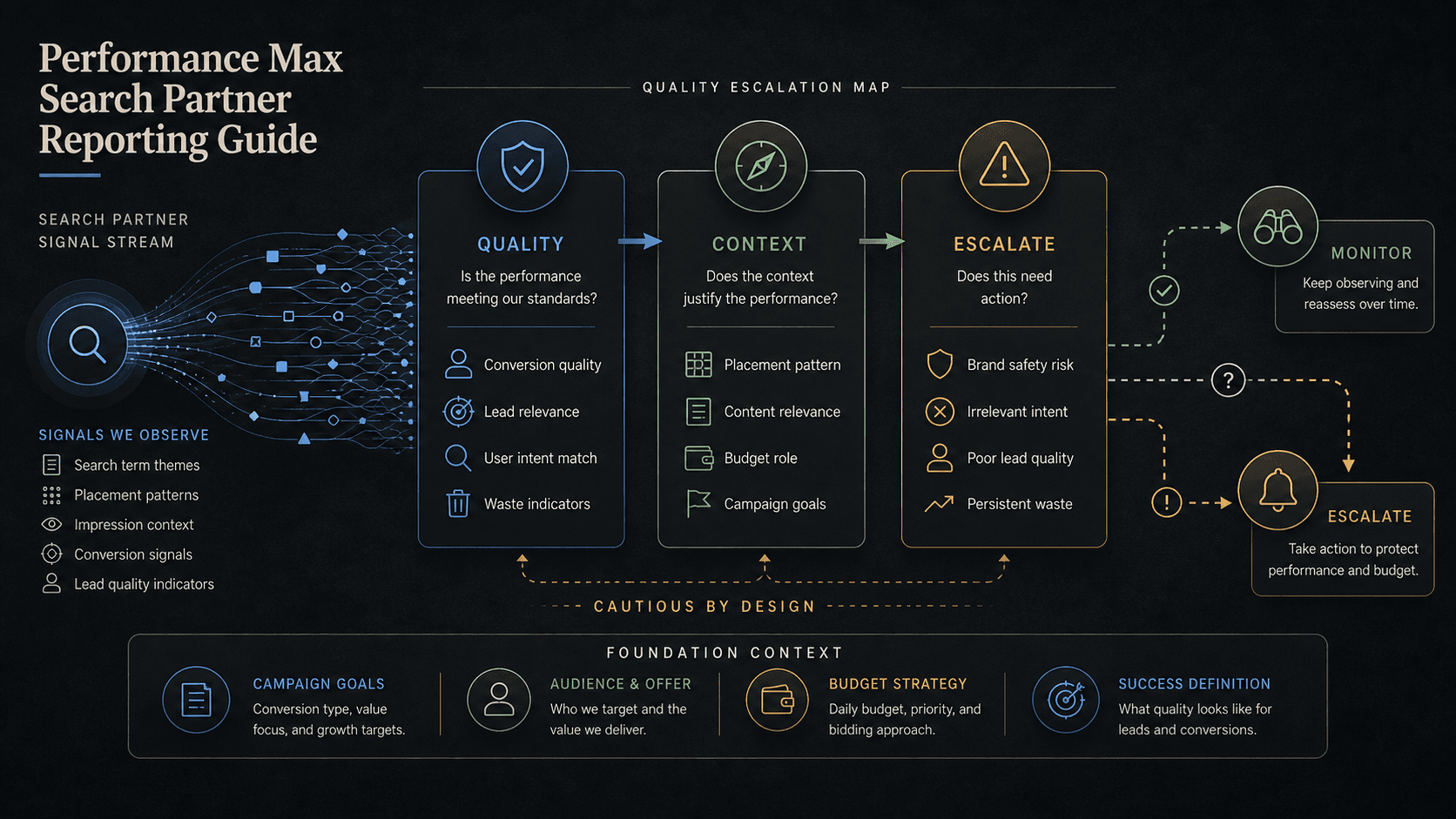
Graphic: Editorial guide to Performance Max Search Partner reporting review.
Search partners are no longer a blind setting in PMax. This guide turns Search Partner placement reporting into a coverage decision you can review, score, and escalate with evidence.
Key takeaway
For years, Search partners in Performance Max felt like a checkbox you either trusted or turned off without much evidence. Google's Search Partner Network announcements describe expanded placement visibility and clearer controls. Placement reports for Performance Max, documented separately, give teams site-level inventory to review. The decision is no longer faith. It is coverage: keep the reach, narrow it, or escalate with written proof.
The weekly review pairs Search Partner placement visibility with conversion quality, lead grades, CPA, ROAS, and budget movement. Escalate only when the pattern repeats. Parallel AI can summarize Search Partner concerns from the connected account, write the quality review in a doc or spreadsheet, and draft exclusion or campaign changes for a person to approve.
Checked against current product, pricing, trust, and official Google materials so the comparison, buying guidance, and fit criteria stay current and defensible.
- Google's Search Partner Network announcements document expanded placement visibility and account-level controls.
- Search Partner placement patterns were compared with conversion quality, lead grades, CPA, ROAS, and budgets before escalation.
- Parallel's role stays limited to quality summaries, finished review notes, and drafted exclusions held for human approval.
You remember when Search partners was a campaign setting you inherited from an old playbook. On or off. Little middle ground. Little site-level proof. Now the account lead asks a harder question: which partner placements are worth the reach and which ones are taxing lead quality.
DEFINITION
Search Partner Network reporting
Google's Search Partner Network announcements describe expanded placement visibility and clearer controls for reviewing where Search partner inventory appears. Performance Max placement reports, listed on the About Performance Max campaigns page, provide the site-level inventory teams review before exclusions or escalation.
Google Ads Help: Search Partner Network announcements
The reframe is coverage, not creed. Faith settings ask whether you trust Google. Coverage decisions ask whether the inventory you can now see earns its spend against your conversion actions and lead grades. That is a better question for PMax, where Search inventory sits beside Shopping, YouTube, and Display in one budget.
Expanded visibility does not mean automatic guilt. A unfamiliar partner site can still carry acceptable CPA if downstream lead quality holds. The reporting change simply removes the excuse for blind toggles. You can keep reach, narrow with placement exclusion lists, or escalate to campaign review, but you should do it with placement rows and quality lines attached.
Performance Max still serves Search inventory alongside Shopping, YouTube, Display, Discover, Gmail, and Maps under one budget, per Google's campaign overview. Search Partner reporting does not isolate partners from that mix in your head. It gives you partner rows to score while the rest of the weekly review continues on channel performance, assets, and search term insights.
Search partners is a coverage decision now, not a belief statement.
Once coverage replaces faith, the review cadence looks like any other placement governance loop, just with higher stakes for lead gen accounts.
Pull Search Partner placements from the Performance Max placement report for the review window. Sort by spend. Partner inventory with thin volume stays on monitor. Partner inventory with repeat spend and weak lead grades moves to escalate.
Compare the same window's conversion actions, CPA, ROAS, and budget pacing. If account wide quality drift explains the week, blaming Search partners alone will send you chasing the wrong lever. If quality harm clusters on partner rows while non partner inventory holds, the coverage decision tightens.
Agency teams should log partner rows the same way they log search term exceptions: date, spend, disposition, owner. Two months of monitor notes turn into escalation proof without another fire drill. Two months of silent toggling turns into client distrust when lead quality finally breaks and nobody can reconstruct what changed.
Review Search Partner placements in PMax
Coverage review starts with spend-sorted partner rows, not with the network toggle.
With the weekly loop defined, each Search Partner concern needs three lines before it earns airtime in a client or leadership review.
Line one is the visible pattern: which partner placements appeared, how often, and at what spend. Google's placement reporting supplies that inventory. Line two is the quality signal: lead grades, qualified lead rate, CPA against target, or conversion value per click in the same window. Line three is business impact: does this pattern move budgets, client trust, or compliance risk enough to act this week.
Search term insights still belong in the review. Partner placements and query drift can show up together. Change history catches weeks where someone edited conversion actions, added negatives, or launched a new asset group. Coverage decisions fail when the placement row is read in isolation.
Finance and client stakeholders rarely want a lecture on network settings. They want to know whether partner inventory is still earning its spend. Three lines in a weekly memo beats a debate about whether you trust Google. Coverage you can inspect is coverage you can explain when CPA drifts on a Thursday call.
When lead quality recovers after a narrow exclusion, log that too. Coverage decisions cut both ways. Keep notes that justify keeping reach, not only notes that justify removing it.
- Document what Search Partner reporting showed and what conversion quality showed in the same date range.
- Separate monitor rows from escalate rows using repeat appearance and material spend thresholds.
- State whether the next step is monitor, placement exclusion review, campaign review, or stakeholder escalation.
A Search Partner panic without three lines is still just a screenshot.
Most weeks end in keep with monitoring. Narrowing belongs where repeat partner placements fail quality checks and exclusion lists are the right scope. Escalation belongs where the pattern threatens budgets, client contracts, or account-level controls.
Narrow or escalate when
- Partner placements repeat across review windows with poor lead grades or CPA above target.
- Spend on partner inventory is large enough to change weekly pacing or the client narrative.
- Placement exclusion lists or campaign-level changes are scoped, owned, and explainable in writing.
Keep with monitor when
- Partner rows appeared once with low spend and acceptable downstream quality.
- Account wide quality drift tracks to conversion tracking, assets, or search themes instead of partner sites.
- The team cannot yet state the business impact line. Visibility alone is not escalation.
Search Partner reviews fail when the evidence lives in screenshots and the decision lives in someone's memory. Parallel AI pulls Search Partner placements, conversion actions, and budget context from the connected Google Ads account, writes the coverage memo in a doc or spreadsheet with monitor and escalate rows, and drafts placement exclusion list or campaign changes for a person to approve. That turns a faith setting into a governance habit the client can read. See and . On Monday morning, pull last week's Search Partner placements, sort by spend, mark repeat rows that failed lead quality, and decide keep, narrow, or escalate before anyone touches campaign network settings.
Google documentation
Google's Search Partner visibility and control announcement for placement reporting and governance pages.
Google's help page for Performance Max placement-report visibility and limits.
Official Performance Max reference for campaign scope, inventory, goals, asset groups, and optimization context.
Official reporting reference for Report editor, predefined reports, saved reports, and manager-account reporting.
- Blog homeBrowse every published Google Ads guide from one editorial index.
- Google Ads AI agent: complete guideThe pillar guide covers the category definition, the adoption model, and where the agent fits real Google Ads work.
- ResourcesMove between the definition page, pricing, product walkthrough, and trust pages.
- About Parallel AISee the company mission, editorial standards, and operating principles behind the product.
- SecurityReview the public data-handling, account-connectivity, and approval-control framing used throughout the published guides.
- Author profileSee the background, specialties, and editorial responsibilities behind the published guides.
- Editorial reviewReview how pricing, trust, and capability claims are checked before public content ships.
- Search Partner Network Placement Reporting AuditHelpful when Search Partner placement visibility needs evidence-led quality review before exclusions or escalation.
- Performance Max Placement Audit: Find Waste and Lead-Quality DriftHelpful when placement visibility outruns lead quality answers and the team needs subtractive rules before exclusions ship.
- Performance Max Channel Reporting PlaybookHelpful when channel mix shifts every week and the team needs a routed follow-up instead of another dashboard debate.
- How to Find Wasted Spend in Google Ads With AIFor accounts that need lower wasted spend without overblocking useful traffic.