

Placement Quality Audit
Performance Max Placement Audit
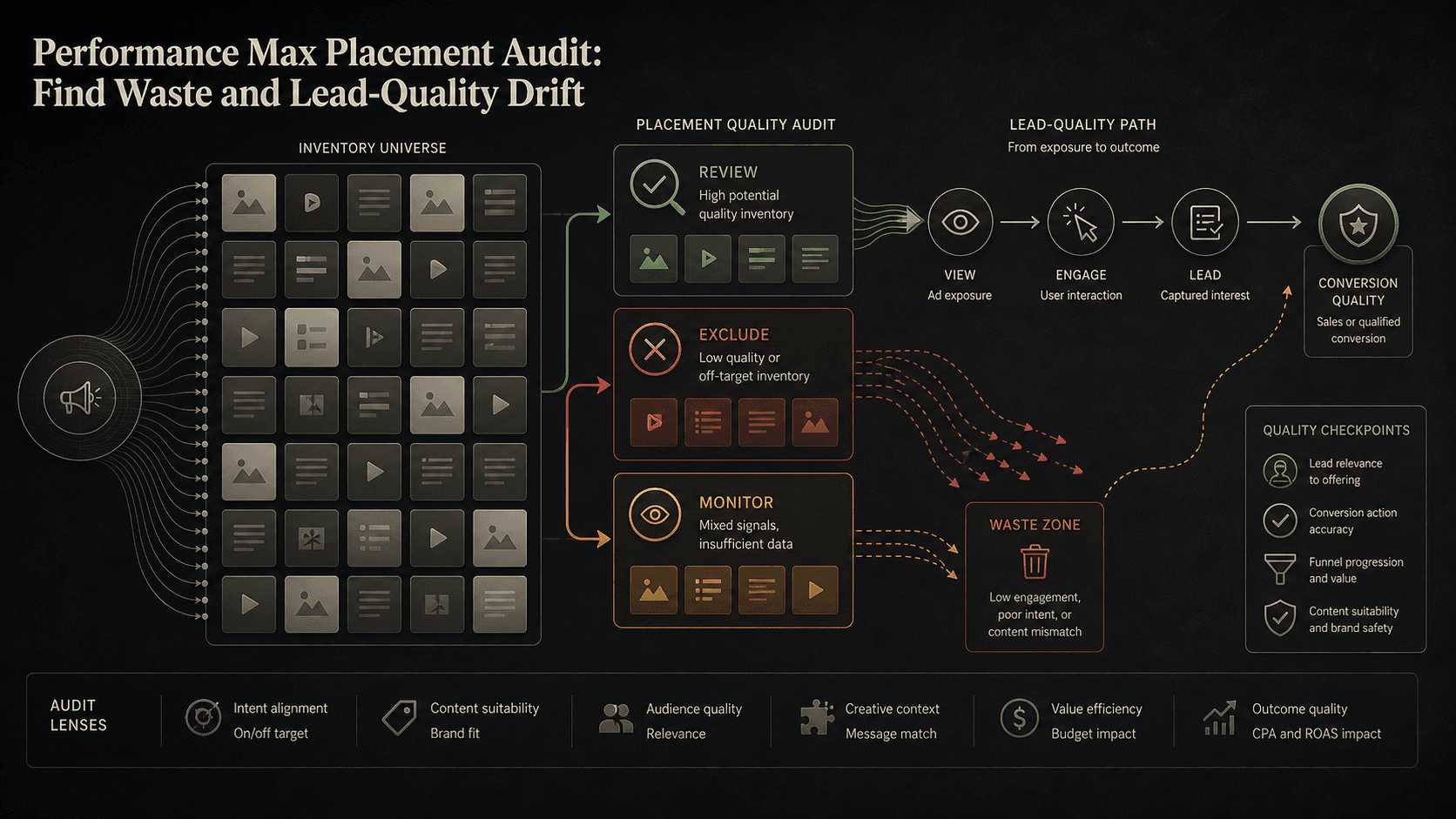
Graphic: Editorial guide to Performance Max placement quality review.
PMax placement audits pay off in exclusions, not additions. This guide ties placement reports to lead quality, conversion actions, and written exclusion rules before spend moves.
Key takeaway
Lead quality softens on a PMax campaign and the placement report finally shows where impressions clustered. The temptation is to exclude everything that looks unfamiliar. The better frame is subtractive: placement reporting exists so you can remove inventory that repeatedly fails quality checks, not so you can react to every new URL.
Google documents placement reports and placement exclusion lists as separate surfaces. The audit connects them: pull placements, score patterns against lead quality and conversion actions, then exclude only where the evidence repeats. Parallel AI can cluster suspicious placements from the connected account, write the audit in a doc or spreadsheet, and draft exclusion lists for a person to approve.
Checked against current product behavior, account-review tools, and official Google materials so the explanation matches the real review process and live product boundaries.
- Google's About Performance Max campaigns page lists placement reports among PMax reporting options alongside channel performance and asset group reporting.
- Placement patterns were compared with lead quality, conversion actions, CPA, ROAS, content suitability, and change history before any exclusion.
- Parallel's role stays limited to clustering placements, finished audit write ups, and drafted exclusions held for human approval.
Friday afternoon, CRM lead grades dip and someone pastes twelve placement URLs into the group chat. Half look off brand. None yet prove they caused the quality slide. That is the usual start of a placement audit that goes nowhere: visibility arrives faster than conviction, and the team treats every new row as an action item.
DEFINITION
Performance Max placement reports
A Google Ads reporting surface listed on the About Performance Max campaigns page alongside channel performance and asset group reporting. Placement reports show where ads appeared. Placement exclusion lists, documented separately in Google Ads Help, let teams block specific placements at campaign or account scope.
Google Ads Help: About Performance Max campaigns
The reframe is subtractive. You are not hunting placements to understand PMax. You are hunting repeat failures worth removing. Google's placement reporting gives the inventory list. Your lead quality data, conversion actions, and CPA floor supply the verdict. A placement audit that ends with zero exclusions can still be a good week if the monitor list is honest. A placement audit that ends with forty exclusions and no written rule is usually a bad one.
Content suitability settings and account-level brand safety controls already steer some inventory away. The audit fills the gap where reporting surfaces a specific app, site, or channel placement that keeps appearing despite acceptable aggregate CPA. Subtraction is the win because PMax budgets are finite. Every click on a weak placement is a click that did not go to a better one.
Lead gen teams feel this first on mobile app placements and parked domain inventory that clears aggregate CPA while failing CRM scoring. Ecommerce teams feel it on off category publishers that steal remarketing reach. The subtractive frame keeps both cases honest: you are removing inventory that failed your quality bar twice, not punishing every URL that made you uncomfortable on first glance.
The goal is fewer bad placements, not a longer placement spreadsheet.
Once the subtractive frame is set, the scoring work is what separates a durable exclusion list from a weekly panic.
Monitor threshold
1 appearance
Unfamiliar placement with thin volume or unclear quality signal.
Escalate threshold
2 review windows
Placement reappears while lead quality or CPA drifts the wrong way.
Exclude threshold
3+ aligned signals
Repeat appearances, poor lead grades, and no countervailing conversion value.
Illustrative CPA floor
$52
Example target on a lead gen PMax campaign; numbers are illustrative, the repeat rule is not.
The illustrative example: a mobile game app shows up in three consecutive weekly pulls with $840 spend, zero qualified leads, and a CRM fail rate twice the account average. That pattern justifies a placement exclusion list entry. A news aggregator that appeared once with $12 spend and one converted lead belongs on the monitor list, not the exclude list.
Search term insights and change history still matter. Sometimes placement weirdness is a symptom of query drift or a new auto generated video asset, not the placement itself. Before you exclude, check whether the same week brought new search themes, asset edits, or conversion action changes. Subtractive does not mean fast. It means justified.
Placement exclusion lists documented in Google Ads Help can apply at campaign or account scope. The audit should name the scope before anyone clicks save. Account level lists protect the whole brand. Campaign level lists protect one offer with unusual sensitivity. Writing the scope in the audit note prevents the classic rollback where a broad exclusion starves a healthy campaign two weeks later.
Open placement reporting for the PMax campaign
With scoring thresholds set, the weekly audit becomes a short sequence that any lead on the account can run without reinventing the rules.
Pull placement reports for the review window and sort by spend, not by discomfort. High spend placements with weak quality signals rise to the top. Low spend oddities stay on monitor until they repeat or until quality drifts account wide.
Line placement patterns against conversion actions, lead grades, CPA, ROAS, and budgets in the same window. A placement that looks strange but carries acceptable cost per qualified lead is a monitor item. A placement that looks ordinary but correlates with CRM rejects is an escalate item.
Weekly cadence matters because placement inventory in PMax can shift as Smart Bidding chases conversions across Google's networks. A subtractive audit is never finished. It is a standing filter that removes repeat failures while the campaign keeps learning inside the inventory you still trust.
- Read content suitability settings and account-level brand controls before blaming individual placements.
- Compare placement movement with search term insights and change history from the same week.
- Record monitor, escalate, or exclude with the evidence line that justifies each disposition.
Visibility without a quality line is still just a URL list.
Exclusions are subtractive wins only when they survive a second reviewer. If nobody can explain why a placement left the account, the exclusion will get reversed in a panic two weeks later.
Exclude or escalate when
- The placement reappears across review windows while lead quality, CPA, or brand risk worsens.
- Spend on the placement is material enough to affect weekly pacing or the client narrative.
- Content suitability or policy risk is clear enough that another reviewer would agree in writing.
Monitor when
- The placement appeared once with low spend and acceptable downstream lead grades.
- Account wide quality drift points to conversion tracking, search themes, or assets instead of one URL.
- Nobody documented the exclusion rule. Reactive blocks tend to unblock just as reactively.
Placement audits are subtractive work, which means the write up matters as much as the click path. Parallel AI pulls placement reports, conversion actions, and lead quality context from the connected Google Ads account, clusters repeat offenders, and drafts the audit in a doc or spreadsheet with monitor, escalate, and exclude dispositions. When the evidence supports removal, it drafts placement exclusion list changes and waits for a person to approve them. That keeps the win subtractive in practice, not just in theory. The account owner sees the pattern, the spend, and the quality line before anything is blocked. See for the broader waste review model. On Monday morning, pull last week's placement report, sort by spend, mark every repeat placement that failed lead quality, and draft exclusions only where the pattern already survived one review window.
Google documentation
Google's current help page for Performance Max placement-report visibility and limits.
Google's documentation for reusable placement exclusion lists across campaigns and accounts.
Official Performance Max reference for campaign scope, inventory, goals, asset groups, and optimization context.
Official reference for using the search terms report to review which searches triggered ads and identify keyword or negative keyword updates.
- Blog homeBrowse every published Google Ads guide from one editorial index.
- Google Ads AI agent: complete guideThe pillar guide covers the category definition, the adoption model, and where the agent fits real Google Ads work.
- ResourcesMove between the definition page, pricing, product walkthrough, and trust pages.
- About Parallel AISee the company mission, editorial standards, and operating principles behind the product.
- SecurityReview the public data-handling, account-connectivity, and approval-control framing used throughout the published guides.
- Author profileSee the background, specialties, and editorial responsibilities behind the published guides.
- Editorial reviewReview how pricing, trust, and capability claims are checked before public content ships.
- Performance Max Search Partner Reporting GuideHelpful when Search Partner visibility finally arrived and the team needs a keep, narrow, or escalate loop instead of a blind toggle.
- Search Partner Network Placement Reporting AuditHelpful when Search Partner placement visibility needs evidence-led quality review before exclusions or escalation.
- How to Find Wasted Spend in Google Ads With AIFor accounts that need lower wasted spend without overblocking useful traffic.
- Performance Max Campaign-Level Negative Keywords GuideHelpful when Performance Max search terms need tighter control but broad negatives could redirect budget away from valuable intent.